Measure and analyze office utilization

All data that we collect in the Flexopus hot desk booking software is made available to you in a prepared form in the Smart Analytics Dashboard. Analyzing this historical data provides you with important insights into the utilization of your space, booking behavior, and home office habits of your staff, helping you optimize your space.

Workplace booking system Flexopus
DESK SHARING STATISTICS

Utilization analyses of buildings

In the dashboard you can see at a glance which properties are most popular or on which days of the week the most bookings were made. In addition, statistics on booking numbers in months, days or hours are collected.

STATISTIKEN FÜR JEDEN GRUNDRISS

Auslastungsanalysen von Etagen

Die Auslastung Ihrer Flächen kann auch auf Ebene der Etagen ausgewertet werden. Wählen Sie zwischen vordefinierten und individuellen Zeiträumen, um Buchungen Ihrer Mitarbeitenden anonymisiert auszuwerten. Temporäre Spitzen und weitere Kennzahlen sind dank einer Vielzahl an Auswertungen leicht zu erkennen.

IMPORT & EXPORT FUNCTION

Own evaluations via data export

If the dashboard is not enough for you and you want even deeper analyses, our powerful export function is available. This allows you to export all data collected by Flexopus in CSV format and further process it in Microsoft Excel, Google Sheets or the data processing program of your choice.

Benutzerstatistiken
Benutzerstatistiken

Statistiken auf der Benutzerebene

Als optionale Einstellung und mit der passenden Zustimmung können Auswertungen auch auf Benutzerebene erfolgen. Wie oft bucht eine spezifische Mitarbeiterin oder ein spezifischer Mitarbeiter Arbeitsplätze im Büro oder Parkplätze? Wie viele Besprechungsräume werden gebucht? Welche KollegInnen kommen am meisten ins Büro? Standardmäßig sind Auswertungen auf Benutzerebene aus Datenschutzgründen jedoch deaktiviert.

Flexopus Note!

In order to meet our data protection and data security standards, we do not evaluate personal data in the dashboard in the Flexopus standard configuration. Analyses are carried out exclusively at the object level and thus meet even the highest compliance requirements of data protection officers or works councils.

Buchen Sie eine Live-Demo!

We will guide you through the application during a joint appointment.

Markus Merkle
Sales Manager
Sales Manager
Office occupancy statistics

Identify popular objects on the heatmap

Identify low and high occupancy rates of properties at a glance on our heatmap.
Bird's Eye View of Parking Space Booking with Flexopus Parking Software
SMART ANALYTICS DASHBOARD

Optimize your hybrid office

Analyzing historical data helps you make decisions about organizational and facility-related optimizations in the office. There are many concrete use cases for this decision-making aid. For example, costs can be saved, employee satisfaction increased and everyday office life optimized.

Find peak times

Identify days when your offices are too crowded. The resulting noise can quickly lead to stress. You can counteract this with special attendance regulations on these days.

Flexopus Card Team

If the utilization of your space is permanently low, you can quickly find out in the Smart Analytics Dashboard. Excess space can be rented out, which can save costs.

Ready in a few days

Identify underused rooms or areas in seconds and relocate employees to other areas. Reducing the area helps to save energy costs.

1 / 7

Shared Desk Reservations in Calendar View
Statistics Overview
Flexopus offers a variety of utilization analyses. Use the provided metrics or export the data to create your own statistics.
Shared Desk Reservations in Calendar View
Utilization analyses of objects
Set targets for office occupancy and make data-driven decisions about downsizing or expanding with Flexopus.
Shared Desk Reservations in Calendar View
Time Heatmap
With the Time Heatmap you can calculate the peak times of all bookings at building or floor level down to the hour. Select an individual period.
Shared Desk Reservations in Calendar View
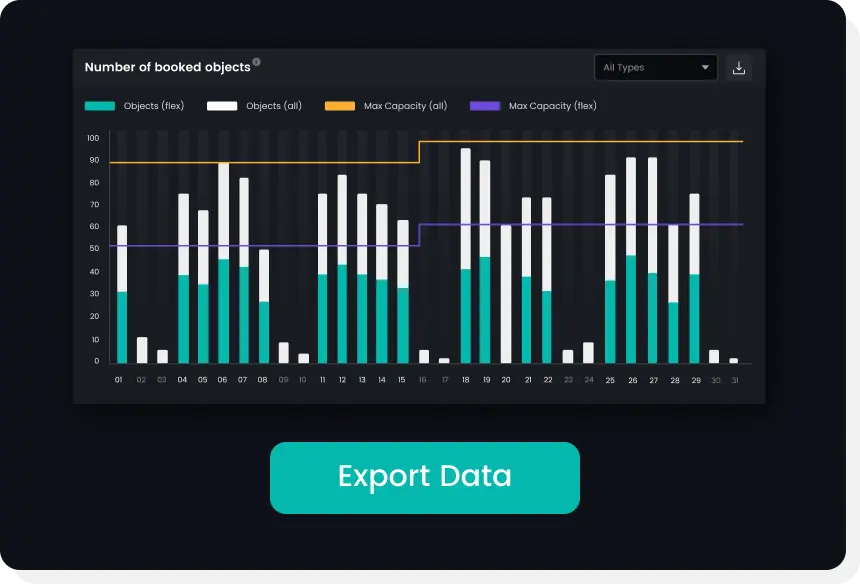
Number of all/reserved objects
Based on the anonymized bookings, Flexopus evaluates several occupancy indicators at the building and floor level. Capacity utilization is calculated daily.
Shared Desk Reservations in Calendar View
Check-in Rates & Expired Reservations
Have you activated the Flexopus check-in & check-out module? You can have the number of missed check-ins evaluated on a personal and/or anonymous basis.
Shared Desk Reservations in Calendar View
Number of objects (Flex, Fix, Block)
You can track the number of bookable, fixed and blocked objects over time. You can use these figures, for example, for an occupancy analysis: Number of booked properties / Number of bookable properties = Occupancy in %
Shared Desk Reservations in Calendar View
Meeting room capacities
If you have linked several meeting rooms to Flexopus, you can have the capacities of the meeting rooms evaluated according to size.
Administrative permissions

Manage rights and roles

With the help of a granular rights and roles system, people in Flexopus receive precise access to the functions they really need. Access controls and booking limitations can also be implemented in this way.

Book a non-binding appointment!

Would you like to learn more about Flexopus, its features and pricing, or schedule a demo call? We will be happy to advise you and find the perfect solution for you.