Manage conference rooms with the Flexopus room booking system
Book your conference rooms with Flexopus in just a few steps and connect your Outlook calendar to enable bidirectional synchronization of the room booking systems - simple, seamless and user-friendly!
.webp)
Already in use in over 4,000 offices!














How the Flexopus room booking system works
The top features of the room booking software
Booking display & statistics

The interactive floor plans make it possible to view all existing room bookings or to make new bookings directly. In addition, the minute-by-minute occupancy of each room is visualized in a heat map.
Electronic door signs
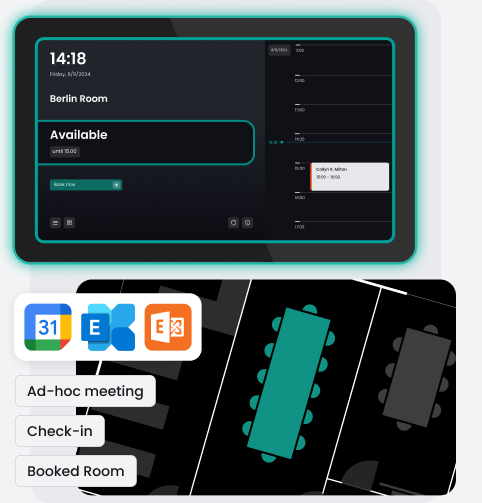
The Flexopus Digital Signage Add-On enables the operation of electronic door signs to display room occupancy in your conference rooms. In addition to displaying bookings, spontaneous ad-hoc bookings for meeting rooms can also be made via kiosk systems.
Catering service
Plan meetings including catering, IT support, or cleaning. You can conveniently add everything to the room booking via the service module. Flexopus coordinates the orders and informs all service providers directly and automatically.
Seamless integrations
Synchronize meeting room bookings from Microsoft or Google with Flexopus. This allows bookings to be evaluated, displayed on electronic door signs, and checked in via Flexopus. Additionally, events can be created and managed.
Check-in module
Meeting rooms are often reserved for regular appointments, which are often not cancelled or only take place online. Using the check-in module, unused meeting rooms can be automatically released if participants do not confirm their presence on site.
.webp)
.webp)










The advantages of room booking software

Hosted in Germany
For secure data storage, Flexopus is hosted in Germany on dedicated servers of Hetzner Online GmbH.

ISO 27001 certified
Flexopus is certified by TÜV Rheinland according to ISO 27001:2022 and therefore offers certified information security for your company.

Fair billing model
We bill transparently based on resources rather than the number of users - especially practical for companies with many employees.

Fast onboarding
Thanks to our intuitive structure, Flexopus is ready to use in no time, so you can start being productive right away.

Granular booking rules
Define precise rights and rules for different teams, locations, or individual resources.

IoT integrations
Link Flexopus with smart hardware such as sensors or digital door signs for even more efficient space management.

For all office sizes
Whether you manage a small office or multiple locations – Flexopus can be individually scaled.

Accessibility
Our software is designed to be equally easy and fully accessible to all employees.
.svg)
Book a live demo!
Are you interested or do you have any questions?

The advantages of our room booking system

Room booking in 3 steps
Booking a room with Flexopus is easy and only takes a few moments. Simply select your desired time period and location, and book your room on the map from a bird's-eye view.
Room booking in 3 steps
Booking a room with Flexopus is easy and only takes a few moments. Simply select your desired time period and location, and book your room on the map from a bird's-eye view.

Instant room booking
You can easily make ad-hoc bookings via the Flexopus app or directly on the electronic door sign and cancel them there. This will further improve the flexible use of meeting rooms and optimize their capacity utilization.
Instant room booking
You can easily make ad-hoc bookings via the Flexopus app or directly on the electronic door sign and cancel them there. This will further improve the flexible use of meeting rooms and optimize their capacity utilization.
.webp)
Electronic door signs
Connect your room occupancy plan in Outlook with Flexopus' electronic door signs and effortlessly transform your office into a smart office. With the Digital Signage add-on module, you can efficiently expand your work environment with digital door signs.
Electronic door signs
Connect your room occupancy plan in Outlook with Flexopus' electronic door signs and effortlessly transform your office into a smart office. With the Digital Signage add-on module, you can efficiently expand your work environment with digital door signs.

Catering and office services
Flexopus allows for the efficient mapping of catering and other office service processes. Configure which services are available to employees and record orders directly via Flexopus. These orders can then be forwarded internally to the canteen or office management.
Catering and office services
Flexopus allows for the efficient mapping of catering and other office service processes. Configure which services are available to employees and record orders directly via Flexopus. These orders can then be forwarded internally to the canteen or office management.

Check-in / Check-out
Meeting rooms are frequently booked for regular appointments, which are often not cancelled or only take place online. Using the check-in module, unused rooms can be automatically released if participants do not confirm their presence on site. This is possible in Outlook, the Flexopus app or via QR code.
Check-in / Check-out
Meeting rooms are frequently booked for regular appointments, which are often not cancelled or only take place online. Using the check-in module, unused rooms can be automatically released if participants do not confirm their presence on site. This is possible in Outlook, the Flexopus app or via QR code.

Booking management as administrator
As an administrator, you have the ability to view, manage, and delete all meeting room bookings. Optionally, synchronized bookings from Microsoft Exchange Online and Google Calendar can also be deleted directly via Flexopus.
Booking management as administrator
As an administrator, you have the ability to view, manage, and delete all meeting room bookings. Optionally, synchronized bookings from Microsoft Exchange Online and Google Calendar can also be deleted directly via Flexopus.

Usage & analysis in one app
In addition to operational room management and conference room booking and other objects, you can analyze the utilization of your meeting rooms in detail with Flexopus. Future decisions on the design of areas can therefore also be made in a data-driven manner.
Usage & analysis in one app
In addition to operational room management and conference room booking and other objects, you can analyze the utilization of your meeting rooms in detail with Flexopus. Future decisions on the design of areas can therefore also be made in a data-driven manner.
Smart integrations with the Flexopus room booking tool
.svg)
.svg)

.svg)



Customer reviews of the Workplace Management App




Questions and answers
How does room booking work with Flexopus?

Yes, Flexopus allows you to create recurring bookings, for example for regular meetings. You can individually define the frequency and period of bookings. Additionally, you can define the equipment or specific requirements, such as... the desired room size or technical equipment. Flexopus also informs you about possible conflicts within the series, so that alternative rooms or times can be found quickly.
What are the advantages of booking conference rooms with Flexopus?
Flexopus simplifies conference room management and room booking through an intuitive user interface and real-time synchronization, thus eliminating double bookings. Integration with MS Outlook and other common calendars ensures a seamless workflow, while features such as filters by equipment or location allow for targeted selection. Furthermore, Flexopus supports hybrid working models by promoting optimal space utilization and providing valuable insights into resource usage.
Are room changes synchronized between Outlook and Flexopus?
Yes, changes or cancellations of room bookings are automatically synchronized between Flexopus and Outlook. This ensures that all parties involved are always up-to-date and double bookings are avoided. At the same time, the released room is immediately shown as available again, so that it can be used by other colleagues. This automatic synchronization saves time and significantly reduces organizational effort.
Do I need additional software for Outlook room booking with Flexopus?
No, the integration is done via an Outlook add-in that is deployed within your company. Once installed, you can book your conference rooms directly in your familiar Outlook environment without having to install any additional tools. Bookings are synchronized bidirectionally with Flexopus to avoid double bookings.
Blog posts about room booking
.webp)
.webp)
.webp)
Ready for the next step?


.webp)