Modern office concepts
2025-05-21

How room booking systems simplify the workday – Flexopus explains
Stop meeting chaos! In this article, you'll learn how a smart room booking system can save your daily work routine. From avoiding double bookings to interactive room plans and hardware integration: We'll show you how to optimize room utilization and give your team valuable time back. Efficient use of space has never been so easy and transparent!

Table of contents
Meetings, conferences, discussions – despite an increasingly digital working world, face-to-face meetings remain of great importance. It can easily happen that you lose track: the desired meeting room is occupied without prior arrangement, used for other purposes, or several colleagues suddenly appear in the doorway at the same time. Without proper room booking, chaos quickly ensues in an already hectic workday.
This calls for a clear, organized, and accessible solution. A room booking system like Flexopus makes it possible to manage conference rooms, meeting rooms, and all other spaces efficiently, while simultaneously increasing optimal room utilization and adding value for employees.
Digital room booking system
An digital room booking system is essential for an organized workday. Larger companies in particular benefit from a simple overview and the ability for every employee to book intuitively. Through a self-explanatory and easy-to-use system, responsibilities are distributed so that everyone is independently responsible for reserving the resource they need.
Paperless handling of all room-related resources simplifies the management of your meeting rooms and drives the modernization of your office space. A clear overview and simple operation are particularly important here. This allows the system to be introduced as seamlessly as possible.
Thanks to its ease of use, the subsequent step toward other services, such as desk sharing or asset management is easy. Room booking thus offers an entry point into the world of workplace management system.

Room booking app features
A room booking app comes with many useful tools. In addition to general resource optimization, these functions also lead to better time management, efficient workflows, and an office that is better maintained independently. Flexopus offers a range of features that make room management easier:
Booking display & analytics
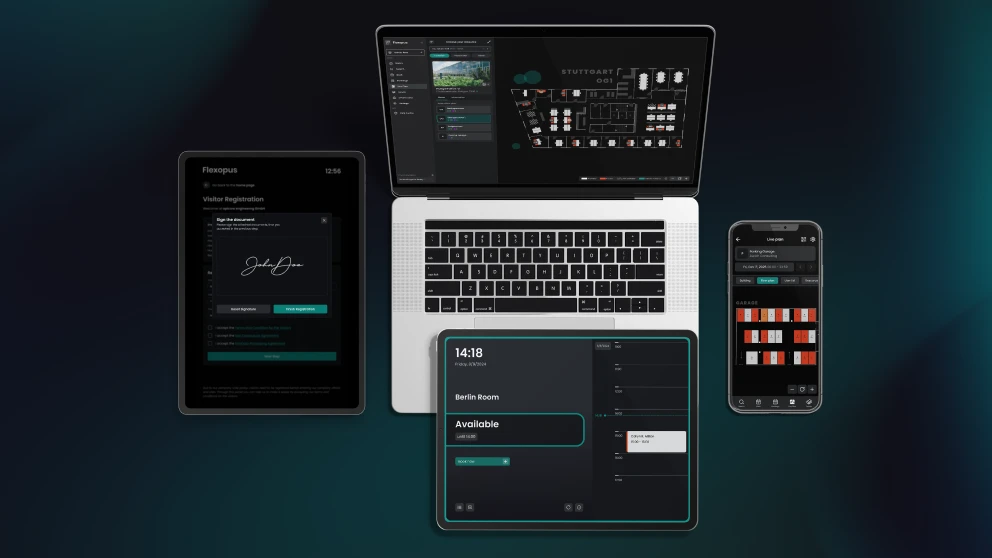
Via the interactive live maps, you can view the occupancy status and all upcoming bookings for a room. The admin area of the application also provides granular evaluations and analyses, such as a heatmap or the number of bookings made.
Electronic Door Signs
With the Flexopus display app Tablets can be placed directly at the entrance of the room, where various details can be viewed and new spontaneous bookings can be made. The occupancy status is color-coded so that you can see at a glance whether the room is free or not.
Catering & Services
Through the integrated catering & services module External service providers can be booked directly when making room reservations via the Flexopus application. They receive all booking details, along with the requested order or quantity. Everything can then be linked to Flexopus cost centers.
Seamless Integrations
Meeting room bookings from Microsoft or Google platforms can be easily synchronized with Flexopus. This allows you to access booking displays, availability, and management tools without ever leaving your familiar work environment.
Check-in module
Through the optional Check-in feature every booking must be confirmed within a specific time window around the start of the reservation. This ensures that if a check-in is missed, the room is released for others to book. This promotes optimal room usage and maximizes space utilization.

Benefits of a room booking system
- Room booking in 3 steps:
Room booking is completed in just a few clicks. Simply select the location, date, and desired room. This allows every user to book intuitively and independently. - Instant room booking:
Spontaneous bookings can be made via the Flexopus application or directly at the electronic door sign. Since the system updates in real time, everything remains up to date. - Electronic door signs:
With the Flexopus Display App, tablets and screens are easily and conveniently converted into digital door signs. This allows you to view booking details and make new reservations directly at the meeting room. - Catering service:
Configure which products are available to employees and manage catering orders directly through Flexopus. These orders can then be forwarded to third-party providers. - Check-in / Check-out:
With the help of the check-in module, unused rooms can be automatically released if participants do not confirm their presence on-site. This is possible in Outlook, the Flexopus app, or via QR code . - Booking management for administrators:
A wide range of insights into bookings and users can be generated via the separate admin area. This provides all administrators with a digitized overview and the ability to configure granular app settings. - Usage & analytics in one app:
With Flexopus, everything stays in one app – whether for users or admins. This keeps all data collected in one central interface, without extra effort and with just a single product license.
Room Booking Display
In addition to the room booking system, providers like Flexopus offer the option to connect displays and screens to the system. This step allows displays to be converted into digital door signs. Here, bookings can be made, occupancy status can be viewed, or a daily overview can be generated.
The Flexopus Display app was developed specifically for such purposes and is a useful tool for optimizing daily work routines and booking behavior.
Features
- Ad-hoc booking via touchscreen
- Display of booking status via color-coded screens
- Interactive operation via the room display
- Check-in function with button selection and QR code integration
- Simple configuration via settings in the admin area
- Synchronization with Microsoft, Google, and other systems
- Customizable booking intervals and individual booking durations
- Flexible use for all room types, including resource management
- Display of booking descriptions and details on the app screen
- Support for various operating systems and devices
Room booking with Flexopus
An room booking system like Flexopus is a simple yet highly effective solution for organizing daily work and maximizing resource utilization in companies. By integrating features such as interactive live plans, electronic door signs, and seamless platform integrations employees can easily book, manage, and spontaneously adjust their meeting rooms.
The system offers not only uncomplicated room booking but also the ability to integrate catering services and analyze occupancy data. The flexibility to use resources efficiently and optimize office life makes Flexopus an indispensable tool for companies looking for a simple, paperless, and organized room booking solution.
The most important questions summarized
What are the biggest office challenges that a room booking system effectively solves?

A room booking system puts an end to "ghost meetings" (booked but empty rooms) and frustrating double bookings. It eliminates time-consuming searches for available space and prevents interruptions during important meetings. Real-time transparency lets everyone know immediately which rooms are available, what equipment (e.g., video conferencing systems) is provided, and how long the current booking will last. This creates a stress-free environment and increases professionalism throughout the company.
How do administrators benefit from the analytics data of a booking system?
Thanks to detailed usage statistics, admins gain valuable insights into actual office occupancy. You can immediately identify which room sizes are particularly popular and which resources are rarely used. This data forms the basis for strategic space planning: perhaps fewer large conference rooms are needed, but more small focus pods? A room booking system provides the facts to optimize rental and energy costs and to adapt office design precisely to the needs of the workforce.
What role does the integration of hardware like room displays play in room booking?
Hardware components like digital door signs bring the system directly to the point of action. They display the status (Free/Occupied) with color coding and allow for spontaneous bookings directly at the display. The "check-in" function is particularly valuable: if a meeting is not confirmed on-site, the system automatically releases the room again. This seamless connection between software and physical space ensures maximum efficiency, minimizes vacancies, and offers employees a modern, intuitive workflow.
Last updated:
2026-11-17