Workplace Management
2025-05-02
.webp)
Catering & Facility Services - Manage service providers with Flexopus
Who is coming to the house today? In this post, we'll show you how to smartly manage external service providers such as cleaners or technicians with Flexopus. Learn how to coordinate bookings for external parties, clarify access authorizations and ensure full transparency in office management. This is how you seamlessly integrate service providers into your hybrid workflow without losing track!

Table of contents
Workplaces and offices only function if all processes function optimally and all employees can carry out their tasks in a targeted manner. Modern offices are full of talented and versatile people, but engaging third-party contractors is still unavoidable for some projects.
Whether catering, IT service provider or cleaning service: In many areas it is the right decision to bring in external support. With Flexopus, service providers and third-party providers can be easily digitized, managed, and integrated into Workplace Management.
This way you always have an overview of all present and future service providers and can view and manage the entire process from invitation to completion with Flexopus.
Catering & Facility Services with Flexopus
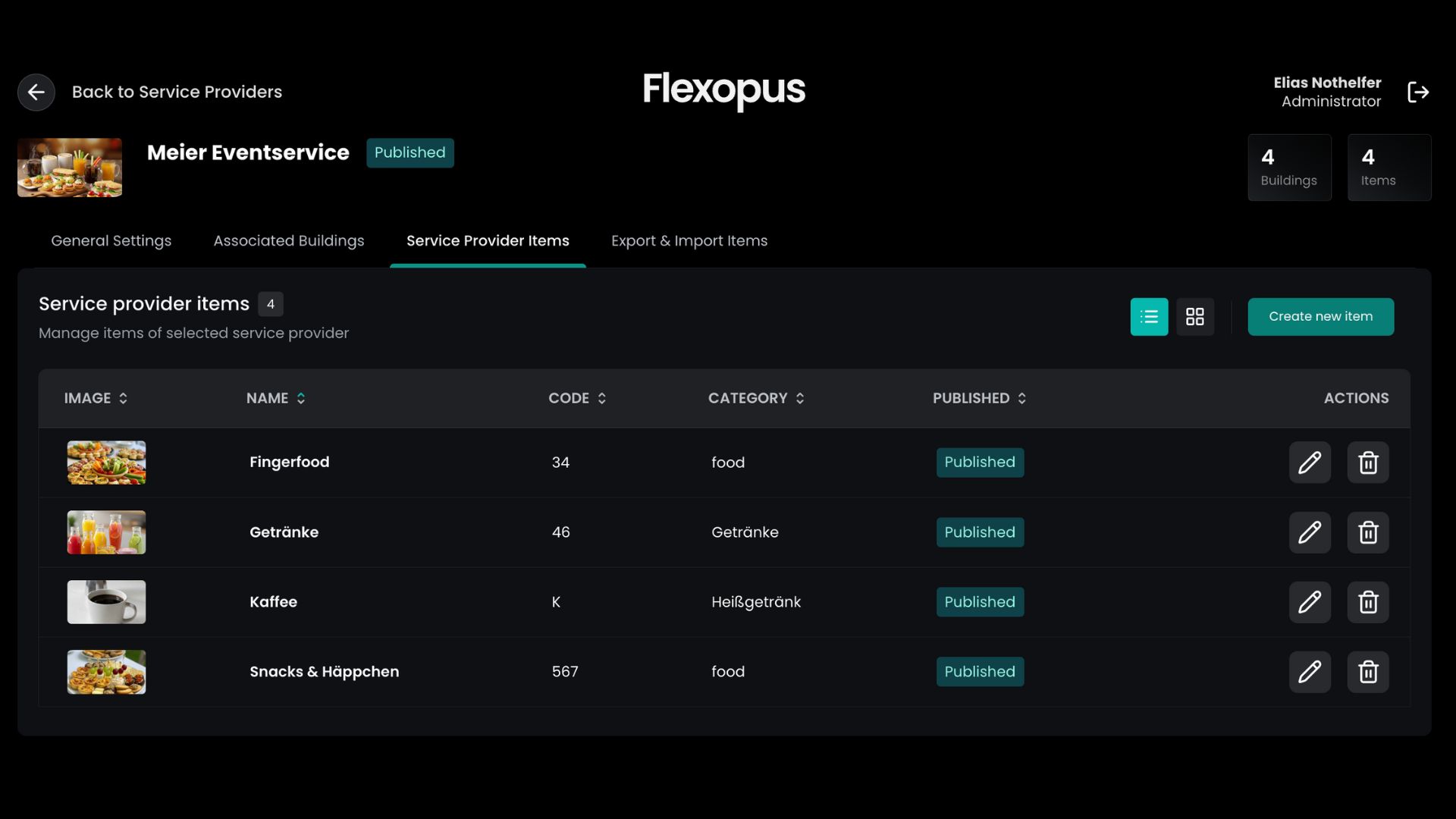
With Flexopus Catering & Services you can register, record and commission service providers in a paperless and uncomplicated manner. Here, any conceivable third-party provider can be directly included in the planning without leaving the familiar Flexopus working environment.
Combined with the room booking system, entire meetings can be planned from start to finish: From the initial catering to the cleaning service afterward – with Flexopus, you stay in control.
Process of a catering or service booking
The process of booking a catering or service takes place in the familiar environment of the Flexopus application. Here, similar to workstations or meeting rooms, the booking tile can be accessed directly from the home page.
Catering and service bookings appear in the booking overview at user level together with all future bookings. In addition, all data can always be viewed and managed via the admin area.
The actual process is simple, but there are several ways to make a booking:
Individual booking of catering and services
- Select “Catering & Services”
- Enter details (title, date, location, provider and notes)
- (Optional) Select position
- Save
The created contractor receives the order directly by email. All details (title, date, location, notes) are also stored here.
.png)
Booking catering & services via room booking
The prerequisite for this is to activate the event management option. Here, the simple room booking is expanded and converted into an event creation, which allows for a more detailed creation of meetings and discussions. A catering or service order can also be added to the events:
- Select “New Event”
- Enter details (name, date, time, location)
- Select “Add service order”
- Enter details (location, provider, comments)
- Save
After saving, the created event is saved together with the catering & service order and stored in the booking overview. The contractor will be informed by email and will receive all necessary details about the order.
.png)
Depositing contractors for catering & services
Each contractor must be registered in the admin area at the beginning. This allows administrators to keep track of all stored contractors and manage them as well.
In addition to the provider details, the associated buildings and managed positions can also be managed here. This means that users are only shown what is actually offered and false bookings are avoided.
There is also an overview of all active orders, which can also be viewed retrospectively. This way, it can be ensured who was in the building on which day - in case retroactive contact is necessary.
.jpg)
Book catering and services directly in Outlook

With the Flexopus Outlook add-in, employees can request additional services such as catering or external service providers directly during the room booking process. The booking takes place in the same step as selecting the meeting time and room, so all relevant requirements are captured centrally in Outlook. This makes meeting preparation more efficient, reduces internal coordination efforts, and ensures that all necessary resources are organized in good time.
Service Provider Functions
The Catering & Service module extends the familiar Flexopus application with another tile. Activating the module adds a variety of useful functions:
Catering and service providers
Manage service providers that perform services in your building. This could, for example, be an external catering service provider that provides food for meetings, a janitorial service that carries out regular checks, or an IT service desk that takes care of IT-related issues.
Manage offered services
Service providers and their positions can be managed in the admin area. Here you can depict almost anything as you wish. From drinks and rental equipment to cleaning, seating and waste disposal services.
Manage orders
Catering and facility services can be managed easily and intuitively as an administrator. The “Service Provider” tab allows you to view all orders in real time and adjust them flexibly.
Approve orders
Determine role holder and their access permissions to external service providers. This allows you to determine which third-party providers require approval and to keep an eye on your expenses using the cost center feature.
Limit orders
Define the framework for ordering catering and facility services yourself. You have full control over the quantities that can be ordered, how far in advance orders must be placed, and how spontaneous changes are possible.
You have full control over the functions, benefits and restrictions surrounding your created service providers and can therefore personally define the scope within which the third-party providers can be used and booked.

Use Cases for Catering & Facility Services
The case studies for Catering & Facility Services are diverse, ranging from a simple order to large-scale work orders and can take on any form and complexity.
Case 1
It may be that one of your employees made a mistake and now the dishwasher in your kitchen has broken down. To avoid unnecessary endless communication, they have already registered a plumbing & tradesman company in the admin area as a precaution. In order to keep track of costs, each new order first requires approval from the location manager.
The person concerned takes care of the order independently, ensures that the responsible persons are present on the day of the order and handles the entire workload themselves. Ultimately, the administrator is only left with the task of releasing the order and assigning the cost center.
Case 2
A big meeting is coming up. A new contractual partner comes by in person with some representatives. The visit should run smoothly and as comfortably as possible. As an admin, you can create a new booking using the room booking system.
You add all the necessary staff and also want to hire a small catering service. Due to the large number of people, you also need new seating in the meeting rooms. The meeting is scheduled to begin at 9 a.m.
You add two service bookings to the room booking. One for catering with 10 pretzels at 8:45 am. The seating should be arranged the evening before. You adjust the time for this job accordingly and order the company for 5:30 pm the day before.
With one click, you can book the room, inform all participating employees, and commission both service providers at the same time. The meeting is now prepared and completely stored in Flexopus. You always keep an overview.

Advantages of Catering & Facility Services
Integrating Catering & Facility Services into your Workplace Management System offers numerous advantages. Flexopus can be used seamlessly with this feature and thus intuitively integrated into your daily work routine:
- App connection:
Bookings can also be made and managed via the user area using the Flexopus Android and iOS app.
- Keep an eye on costs:
With order limits and cost center assignments, you can keep track of all expenses, even if multiple people are booking.
- User-friendliness:
The booking process is similar to the existing procedures. This means that the feature can be used directly by everyone.
- Multifunctional:
There are several ways to make bookings and all required services can be defined according to your wishes.
- Provider management:
The list view of all service providers allows for easy access and a simple overview.
- Building assignment:
Providers can be assigned to different buildings. This means that bookings are only made where they are intended.
- Categories:
Orderable products can be divided into categories to keep the ordering process as simple and efficient as possible.
- GDPR compliant:
As with all Flexopus products and services, data is processed in Germany in strict accordance with GDPR and ISO27001.
Conclusion
With Flexopus, companies have the opportunity to manage their catering and facility services easily and efficiently without losing control. The integration of catering and facility services into the Workplace Management System enables seamless planning and organization of external service providers – be it for meetings, events or everyday tasks. The user-friendly interface, flexible customization, and complete transparency regarding orders and costs keep administrative effort to a minimum while ensuring the quality of the services offered at all times. Flexopus not only contributes to a smooth day-to-day office routine, but also ensures that every detail, from booking to invoicing, is handled professionally and according to the highest quality standards.
Catering & Facility Management with Flexopus: Integrate your catering, cleaning, etc. service providers directly into the Flexopus workplace management app!
The most important questions summarized
What are the benefits of integrating external service providers into a desk sharing tool?

Central administration prevents planning gaps and security risks. When service providers such as IT technicians or cleaning teams are included in Flexopus, facility managers and receptionists always know who is in the building and when. This makes resource planning easier (e.g. parking spaces or work spaces for external consultants) and ensures that services are delivered exactly when they least disrupt office operations.
How does Flexopus help make collaboration with cleaning teams more efficient?
The booking data in Flexopus enables needs-based cleaning. Instead of cleaning every desk across the board, the team can focus on where they actually worked. This saves time and resources. In addition, the software makes it possible to clearly communicate which zones are blocked for maintenance work or when special spaces have been reserved for external service providers, which massively simplifies coordination between internal teams and external personnel.
Can external partners make bookings themselves or is this managed centrally?
Flexopus offers full flexibility here: Admins can create accounts for external partners so that they can book their required resources (such as parking spaces or project tables) themselves. Alternatively, everything can be controlled centrally via Office Management. By assigning specific roles and rights, it is ensured that service providers only have access to the areas relevant to them. This increases security and ensures a smooth onboarding process with every visit.
Last updated:
2026-07-24
.svg)


.webp)
.webp)