Flexopus News
2026-01-22
.webp)
3 Flexopus settings that admins almost always forget
Are you getting the most out of Flexopus yet? It is often small levers that make the big difference. This guide shows you three essential admin settings that are often lost in everyday life: From GDPR-compliant links to team favorites to smart conflict management. Optimize your desk sharing for more user acceptance and a smooth workflow in the office!

Table of contents
Die Einführung von Desk Sharing ist in vielen Unternehmen ein großer Schritt in Richtung hybrides Arbeiten und der Digitalisierung des Büros. Dabei gibt es viel zu beachten, von der Auswahl des Tools, hin zur Ausstattung der Tische und dem richtigen Desk Sharing Leitfaden für das Team. Sie haben sich für Flexopus entschieden – das war schon einmal eine grandiose Entscheidung!
Bei der Einführung von Flexopus muss dabei für das Unternehmen individuell für alle Nutzer viel voreingestellt werden: von der Vorausbuchungsfrist der Ressourcen, der Hinterlegung der Fotos und Logos in der Anwendung bis hin zum Anlegen der Catering und Facility Services. Dabei geraten oft genau die Einstellungen aus dem Blick, die im täglichen Arbeiten einen großen Unterschied machen können. Nicht, weil sie kompliziert sind, sondern weil sie unscheinbar wirken oder schlichtweg vergessen werden.
Vielleicht ist es bei Ihnen gerade auch so: Flexopus ist technisch korrekt eingerichtet, Ressourcen sind angelegt, Nutzer eingeladen, und dennoch bleibt Potenzial ungenutzt. Der Grund liegt häufig in wenigen, aber entscheidenden Admineinstellungen, die entweder gar nicht oder nur teilweise konfiguriert wurden.
In diesem Artikel zeigen wir Ihnen drei Einstellungen, die Admins fast immer übersehen und erklären, warum sie für Datenschutz, Nutzererlebnis und reibungslose Buchungen essenziell sind. Support-Experte Nils Häsicke teilt dabei seine Erfahrungen mit bisherigen Fällen.
Admin-Einstellung Nummer 1:
Datenschutz-Einstellungen vollständig ausfüllen
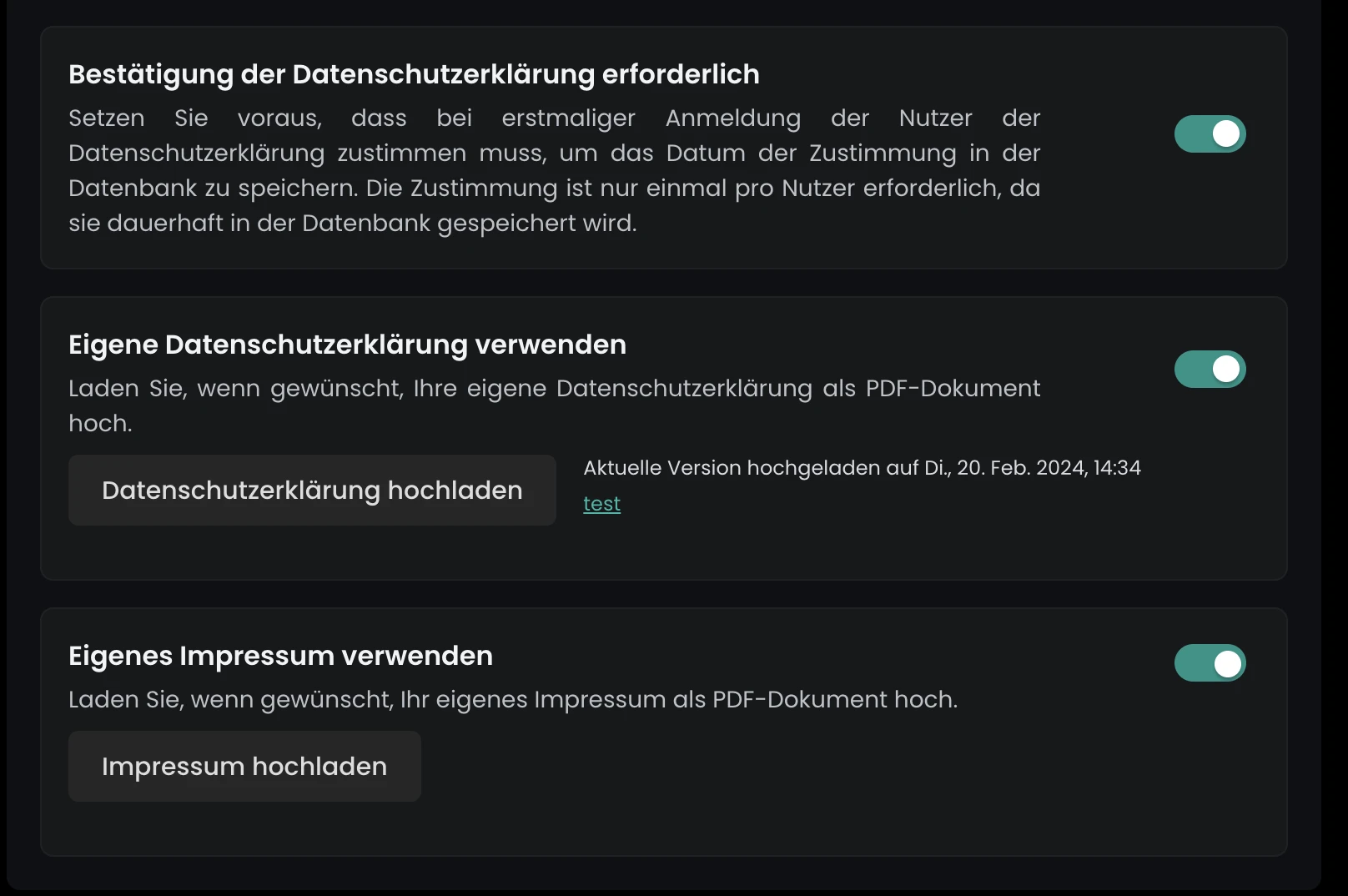
Data privacy is not a peripheral issue but the foundation of every digital application. Especially with workplace management software that handles personal data such as names, bookings, and attendance, transparency is crucial.
In Flexopus gibt es dafür einen klar vorgesehenen Bereich in den Admin-Einstellungen. Hier können Unternehmen ihre Datenschutzinformationen vollständig hinterlegen. Dazu zählen unter anderem das Impressum sowie die eigene Datenschutzerklärung. Diese Informationen werden direkt in der Anwendung ausgespielt und sind für alle Nutzer jederzeit einsehbar.
Was in der Praxis häufig passiert: Der Bereich wird bei der Ersteinrichtung übersprungen oder nur teilweise ausgefüllt. Die Anwendung funktioniert trotzdem, doch aus rechtlicher und kommunikativer Sicht entsteht eine Lücke. Nutzer wissen nicht, wer verantwortlich ist, wie Daten verarbeitet werden oder an wen sie sich bei Fragen wenden können.
„Wir sehen im Support immer wieder, dass Unternehmen Flexopus sehr sauber technisch aufsetzen, aber die Datenschutz-Sektion leer lassen. Dabei ist das einer der einfachsten Schritte, um Vertrauen bei den Mitarbeitenden zu schaffen“, sagt Nils Häsicke, Support Experte bei Flexopus.
Gerade bei größeren Unternehmen oder bei internationalen Teams ist ein sauber ausgefüllter Datenschutzbereich mehr als nur eine Formalität. Er signalisiert Professionalität, Rechtssicherheit und Transparenz. Für Nutzer bedeutet das: Sie können Flexopus bedenkenlos verwenden, ohne sich zu fragen, was mit ihren Daten passiert.
Der Aufwand dafür ist minimal, der Effekt groß. Einmal korrekt gepflegt, bleibt dieser Bereich stabil und muss nur bei Änderungen an den eigenen Rechtstexten aktualisiert werden.
Admin-Einstellung Nummer 2:
Favoriten und Anwesenheitsliste aktivieren
.webp)
Eine Workplace Management Software steht und fällt mit der Akzeptanz der Nutzer. Je schneller, einfacher und intuitiver Buchungen möglich sind, desto eher wird das Tool im Alltag wirklich genutzt.
Zwei Funktionen spielen dabei eine zentrale Rolle: Die Favoriten und die Anwesenheitsliste. Beide sind in Flexopus bewusst schlank gehalten, werden aber erstaunlich oft nicht aktiviert oder kommuniziert.
Favoriten ermöglichen es Nutzern, häufig genutzte Arbeitsplätze, Parkplätze oder Besprechungsräume zu speichern. Statt sich bei jeder Buchung erneut durch Grundrisse zu klicken, reicht ein Klick. Gerade in hybriden Arbeitsmodellen, in denen Mitarbeitende ein bis drei feste Lieblingstische haben, beschleunigt das den Buchungsprozess erheblich. Außerdem gibt es in Flexopus auch eine optionale One-Click-Buchung.
Auch nicht zu unterschätzen für den Teamspirit ist das Anlegen von Kolleginnen und Kollegen als Favoriten: Die Anwesenheitsliste zeigt auf einen Blick, welche Kolleginnen und Kollegen an welchem Tag im Büro sind. Das erleichtert spontane Abstimmungen, fördert Zusammenarbeit und macht das Büro planbarer. Und die Favoriten sind natürlich oben angepinnt.
.webp)
„Viele Admins denken bei Flexopus zuerst an Ressourcenverwaltung. Dabei vergessen sie, dass Mitarbeitende vor allem wissen wollen: Wer ist heute da? Und wie buche ich möglichst schnell? Genau dafür sind Favoriten und die Anwesenheitsliste da“, erklärt Nils Häsicke. Aus Support-Sicht ist das besonders relevant, weil fehlende Aktivierung dieser Funktionen häufig zu vermeidbaren Rückfragen führt. Nutzende empfinden den Buchungsprozess als unnötig umständlich oder vermissen Transparenz, obwohl die Lösung technisch bereits vorhanden ist.
Admins sollten daher nicht nur prüfen, ob diese Funktionen aktiviert sind, sondern sie auch aktiv im Unternehmen kommunizieren. Ein kurzer Hinweis im Onboarding oder ein Screenshot im Intranet reichen oft aus, um die Nutzung deutlich zu steigern.
Admin-Einstellung Nummer 3:
Buchungskonflikte bewusst steuern
Standardmäßig verhindert Flexopus, dass ein Nutzer mehrere Ressourcen gleichzeitig bucht, wenn diese sich zeitlich überschneiden. Diese Logik ist sinnvoll und schützt vor Doppelbuchungen und Chaos und Frust im Alltag.
Es gibt jedoch spezielle Szenarien, in denen genau dieses Verhalten angepasst werden muss. Ein klassisches Beispiel sind Besprechungsräume mit verschiebbaren Trennwänden. Technisch existieren mehrere Räume, organisatorisch sollen sie aber gelegentlich gemeinsam genutzt werden.
In solchen Fällen kann es notwendig sein, dass ein Nutzer mehrere Besprechungsräume zur gleichen Zeit buchen darf. Unser Raumbuchungssystem bietet dafür eine entsprechende Einstellung auf Admin-Ebene, mit der sich die Prüfung von Buchungskonflikten gezielt steuern lässt.
Was häufig passiert: Admins stoßen erst dann auf dieses Thema, wenn Nutzer sich melden, weil Buchungen nicht möglich sind. Dabei ließe sich das Problem im Vorfeld sauber lösen. Vorausgesetzt, man kennt die Einstellung.
„Diese Option ist bewusst kein Standard, weil sie nur in bestimmten Nutzungsfällen Sinn ergibt. Wenn sie gebraucht wird, ist sie aber extrem hilfreich und verhindert viel manuelle Abstimmung“, so Nils Häsicke.
Wichtig ist hier der bewusste Umgang. Die Deaktivierung oder Anpassung der Konfliktprüfung sollte immer auf konkrete Szenarien beschränkt bleiben. Andernfalls kann es schnell unübersichtlich werden, wenn Nutzer unbeabsichtigt Ressourcen blockieren. Admins profitieren davon, ihre Raumlogik regelmäßig zu überprüfen und Sonderfälle frühzeitig zu identifizieren. Gerade bei wachsenden Teams oder sich verändernden Büroflächen lohnt sich ein Blick in diese Einstellung also wirklich.
Fazit: Flexopus auf den individuellen Bedarf einstellen
Oft sind es nicht die großen Features, die über den Erfolg von Desk Sharing entscheiden, sondern die Details in der Konfiguration, angepasst auf den individuellen Bedarf der Nutzer und Unternehmen.
Vollständig gepflegte Datenschutz-Informationen schaffen Vertrauen. Favoriten und Anwesenheitslisten sorgen für Geschwindigkeit, Spaß an der Nutzung und mehr Planung im Arbeitsalltag. Und eine bewusst gesteuerte Konfliktprüfung ermöglicht flexible Sonderlösungen, ohne Prozesse zu brechen.
Wer diese drei Einstellungen überprüft und sauber konfiguriert, holt deutlich mehr aus Flexopus heraus und schafft eine angenehme Erfahrung für das gesamte Team.
The most important questions summarized
Which three Flexopus features are most frequently overlooked by administrators?

It usually comes down to three points: adding custom privacy and legal notice links, enabling the favorites and attendance list for better team coordination, and configuring the logic for booking conflicts in recurring bookings. These details often determine how well the tool is accepted by employees.
How does the favorites feature improve collaboration in the hybrid office?
Hybrid work thrives on personal interaction. When the favorites and attendance list is enabled, users can see when their closest colleagues are in the office. This makes planning in-office days together much easier, turning the office back into a place for genuine connection and strengthening team dynamics, rather than just a place to get tasks done.
What is the biggest strategic advantage when these admin settings are configured correctly?
By making these fine-tuned adjustments, you transform Flexopus from a simple booking tool into an intuitive employee experience platform. When privacy is transparent, team searching is easy, and booking processes are logical, the data quality for your space management increases significantly because employees use the tool consistently and willingly.
Last updated:
2026-10-12
.svg)

_11zon.jpg)
