Workplace Management
2026-02-27
.webp)
Digital Signage Display Software: Use Cases, Implementation, and Best Practices
Digital communication often fails due to a lack of visibility. Digital signage uses displays at central locations (reception, corridors, meeting rooms) to display information in a targeted manner and in real time. The application examples range from internal communication to visitor management and KPI dashboards. A successful rollout requires clear goals, processes and accompanying change communication to make the system scalable.

Table of Contents
In everyday working life, digital communication is often a question of timing, context and visibility. Information that is lost in the intranet or lost in chats does not reliably reach its target group. This is exactly where digital displays come in: They transport messages where people pass by anyway — at reception, in corridors, in meeting zones or at interactive terminals. At these junctions, digital signage helps to simplify work processes and display information where it is really needed.
Examples of using digital signage display software
Digital signage display software is powerful when it not only “beautifully” displays information, but also supports processes: Content is controlled centrally, played out in a targeted manner and adapted to the respective situation. Typical examples:
Internal communication on screens
For internal communication, screens are particularly suitable for short, clear content: news, organizational information, security reports, HR updates, event announcements, new guidelines or a reminder for important deadlines. The advantage: Messages can be centrally planned, quickly updated and played out in real time via a system — ideal for a variety of groups in the same building.
Site and building communication
Especially with several locations, there is often a gap between central information and local requirements. Digital signage solutions enable both: central communication for the entire network and local content (e.g. per floor, reception, part of a building). In this way, control remains consistent while content is designed to suit different locations.
Orientation and visitor guidance
Displays at reception or in passageways support visitor guidance, route planning and appointment organization. Clear presentations count here: Site plans, information about terminals, directions, safety and house rules, or registration instructions. This use case is particularly relevant for public authorities because information must often be standardized, understandable and easily visible.
Meeting and room areas
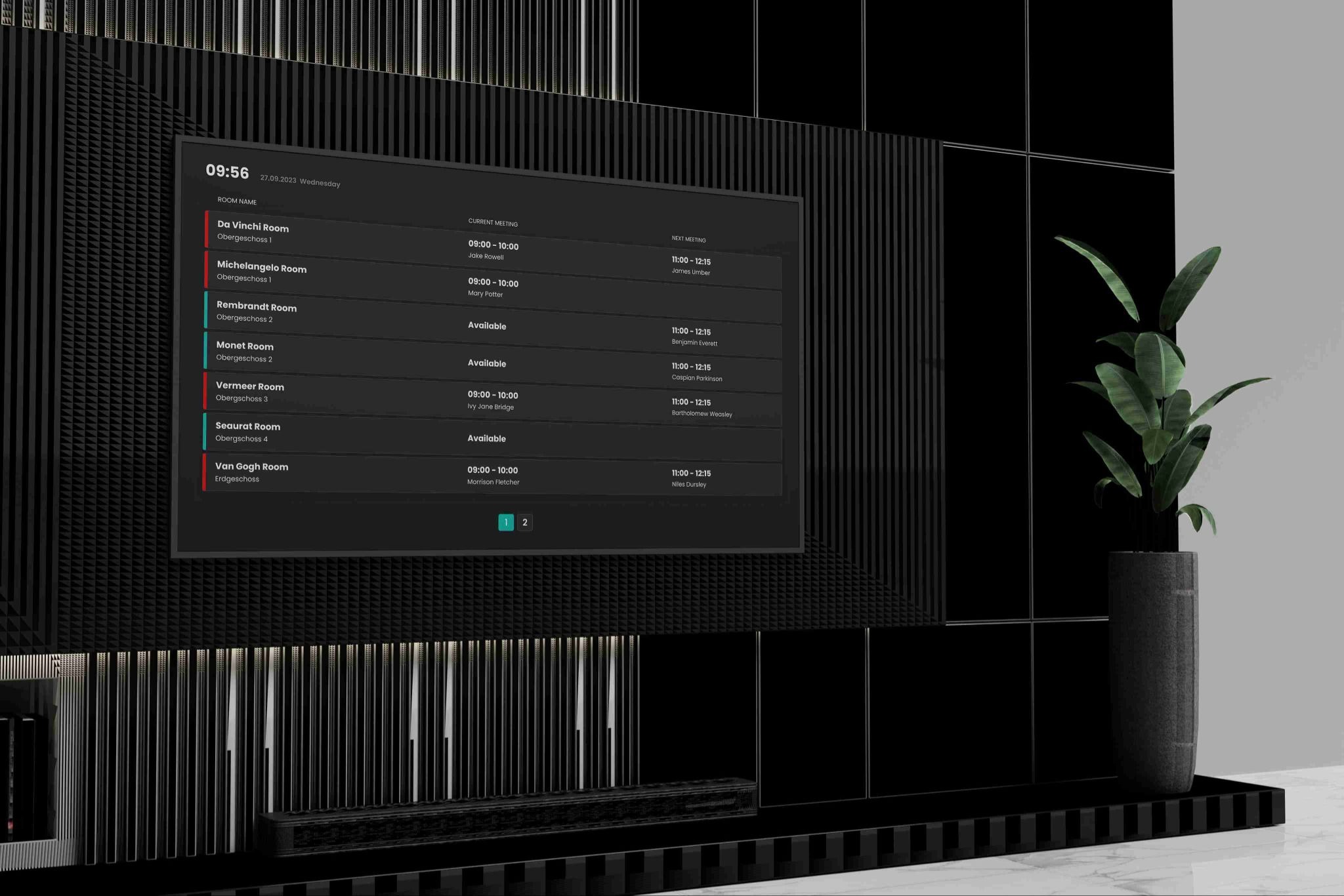
Displays are used around meeting rooms to display occupancy, upcoming appointments or operating instructions (e.g. room rules, technology, capacity). In connection with room bookings, there is noticeable added value: fewer inquiries, less “door handle checks”, fewer misunderstandings.
Dashboards, metrics, and service status
In many companies, screens are used for KPI dashboards: workload, project status, IT service reports or operational key figures — often in real time. It is important here that content is not overloaded: few key figures, easy to read, clear images and understandable visualization.
Content, control and governance: How digital signage remains effective
Many rollouts fail not because of devices, but because of content and responsibilities. Proven principles help ensure that digital signage display software is perceived as a complete solution in the long term:
Content plan instead of flood of content
A short editorial plan prevents screens from being either overloaded or “empty” at some point. A simple logic has proven effective: fixed slots (e.g. internal updates in the morning), changing content (e.g. weekly) and live information (e.g. status, workload, notifications). Content should suit the target group: Reception displays should be designed differently than screens in team zones or close to production.
Centralized administration with clear roles
When many people manage content, rules are needed: Who can create content, who can control it, who approves? This governance is particularly important when multiple sites are involved or when authorities have strict requirements for approvals and communication. Good software supports roles, approvals and central control so that content remains consistent and can still be adapted locally.
Integration and data hygiene
The more systems are integrated, the more important data hygiene is. Integration can bring enormous benefits (e.g. calendar or room information), but it must not make sensitive details visible on the display. The ideal solution shows exactly the information that is useful in the respective context — not anymore.

How do you successfully implement digital signage display software?
A successful rollout is a change project: Technology, processes and communication are intertwined. At Flexopus, we have plenty of experience with the introduction of digital signage and have specially formulated a practical procedure as a numbered checklist:
- Define goals, target group and locations
First, it should be clear which benefits are to be achieved (e.g. better communication, orientation, fewer inquiries, greater transparency) and which target group is reached on which screens. This results in which displays are ideal in which locations. - Prioritize use cases and record requirements
Instead of immediately planning a complete system for everything, it is recommended to start with 2-3 use cases. Requirements can be derived from this: central administration, simple operation, required functions, desired interactive elements, required devices, locations and integrations. - Clarify responsibilities, processes and approvals
For content to be maintained permanently, clear roles are needed: content creation, technical administration, quality assurance. Especially with many users and multiple locations, this structure determines whether the system stays alive. - Start pilot phase with selected screens
A pilot reduces risk: few displays, clearly defined content, fixed learning loops. In this phase, it is easy to see whether the control is intuitive, whether presentations are easy to read and whether content is played reliably in real time. - Plan change communication and build acceptance
Transparency is crucial: What is shown on the screens and what is deliberately not? What are the rules for content and data protection? An accompanying change communication increases acceptance and reduces resistance. - Ensure scaling, operation and development
The pilot is followed by standardization and rollout: templates, content guidelines, responsibilities, device maintenance, monitoring. This turns individual displays into a controllable network across multiple locations.
The digital signage display software from Flexopus
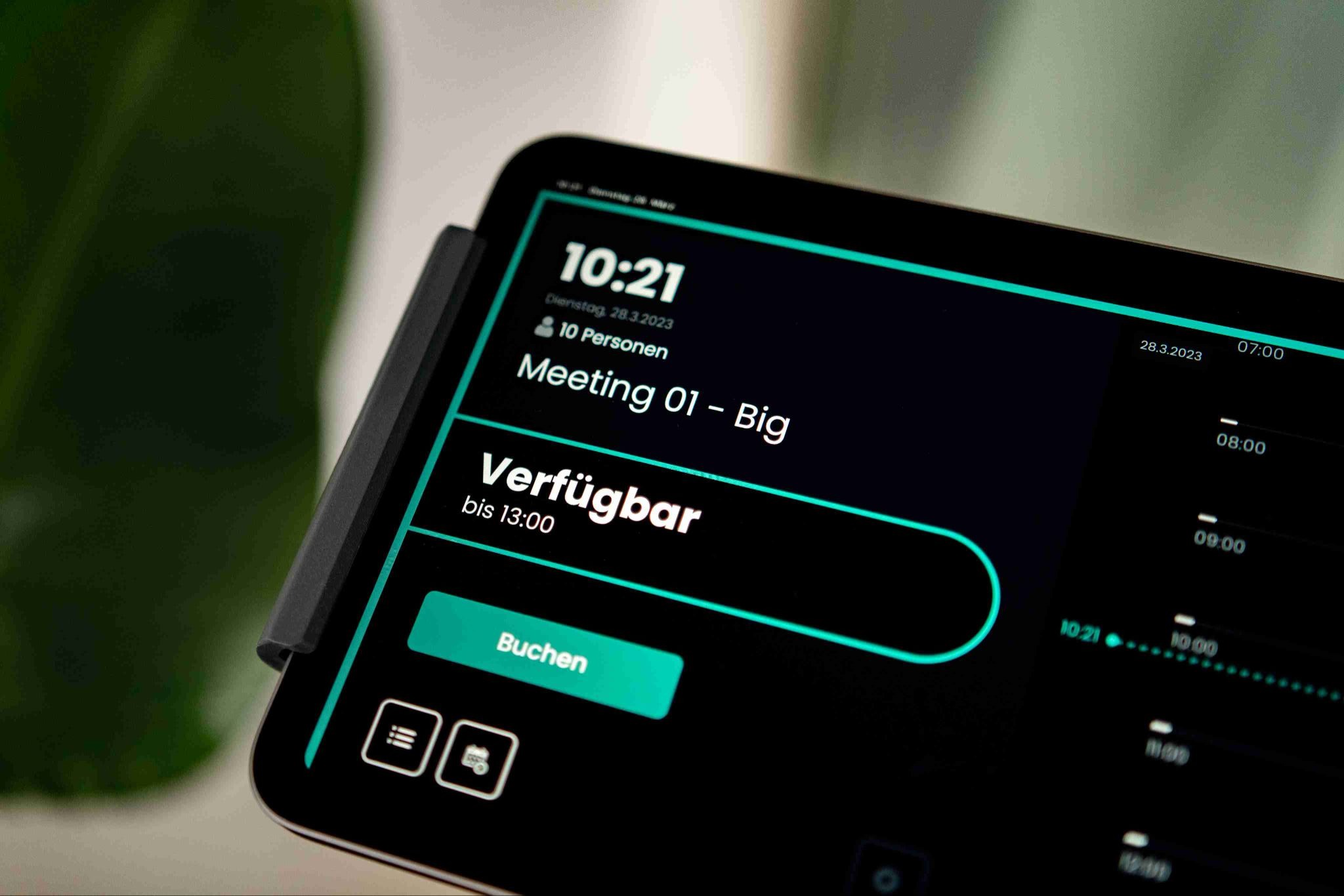
Flexopus complements digital signage in offices where room bookings, transparency and live information are required. With the Flexopus display app existing workplace management is being expanded with innovative screen solutions. Suitable hardware is also available in our Flexopus Store. By connecting the display app, a variety of features can be implemented:
Ad hoc booking
Die Meeting room display app permitted Spontaneous bookings directly on the room display, thus reducing friction and improving utilization.
Meeting room analysis
Flexopus Smart Analytics and the evaluations of room use support a data-based optimization of meeting spaces and capacities.
Attendance indicator
The attendance indicator provides important status information at user level and thus provides better orientation in hybrid working life.
Meeting room finder
With the information screens for meeting rooms, it is always possible to see which room is currently occupied and when it will be vacant again.
Conclusion: Digital signage display software as a scalable communication solution
Digital signage display software develops its value when content is managed centrally, controlled in a targeted manner and linked to clear processes. Clean requirements, a realistic pilot, clear responsibilities and change communication that makes benefits and rules understandable are decisive for success. This creates a user-friendly system from individual screens that can display a wide range of content in real time across locations — as a modern, scalable solution for companies and authorities.
The most important questions summarized
Why is digital signage so important in the modern workplace, and how does it solve communication problems in the office?

Digital signage is crucial because important information often gets lost in chats or intranets. Displays in central locations like receptions, hallways, or meeting zones ensure messages reach people where they already pass by. The software enables central control, rapid updates, and targeted real-time content delivery for internal communication, wayfinding, and status dashboards. This streamlines work processes and reduces misunderstandings, for example with room bookings.
Which typical use cases demonstrate the strengths of digital signage display software in detail?
The software shows its strengths in diverse areas: it serves as a central tool for internal communication (news, safety alerts), supports cross-site building communication, and is essential for orientation and visitor guidance with floor plans and notices. Displays are particularly useful in meeting and room areas to show occupancy and schedules, as well as for KPI dashboards to visualize utilization or project status in real time.
What are the decisive steps and success factors for the sustainable implementation of digital signage display software?
A successful rollout is a change project that connects technology, processes, and communication. First, goals, target groups, and use cases must be defined. Clear responsibilities (content creation, approvals) and an editorial plan to prevent content overload are important. A pilot project reduces risks, and accompanying change communication builds acceptance. Integration and data hygiene are also essential to display only contextually relevant information and operate the system in a scalable way long-term.
Last updated:
2026-10-12
.svg)

.webp)
.webp)
