Flexopus News
2026-07-30
New in Flexopus: Secure, passwordless login with Passkey.
Flexopus now supports passkeys for the web application. Users can log in without a traditional password using a fingerprint, facial recognition, device PIN, or security key. This speeds up the login process and increases protection against phishing. Administrators activate the feature centrally, and users then set up their passkey in their profile.

Table of contents
Passwords have been a part of our digital work life for decades. They must be created, stored, and entered regularly. At the same time, stolen or reused credentials continue to pose a significant security risk.
With the new Passkey Login, Flexopus offers a simpler and more secure login option for the web version. Users confirm their identity directly via their device without having to enter a Flexopus password every time they log in. This makes the login process more convenient and reduces the risk posed by stolen or reused passwords.
What is a Passkey Login?
A passkey is a digital login key that replaces a traditional password. The login is confirmed using a method already set up on the device, for example by:
- fingerprint,
- facial recognition,
- device PIN,
- unlock pattern, or
- a compatible hardware security key.
Technically, passkeys are based on a cryptographic key pair. The private key is protected by the authenticator used, while a public key is stored with the respective service for verification. The private key is never transmitted to the service.
Passkeys are also bound to the specific service or its domain. This means the login key cannot simply be used on a phishing site that looks similar. The FIDO Alliance therefore describes passkeys as phishing-resistant by design.
Passkey Login now available in Flexopus
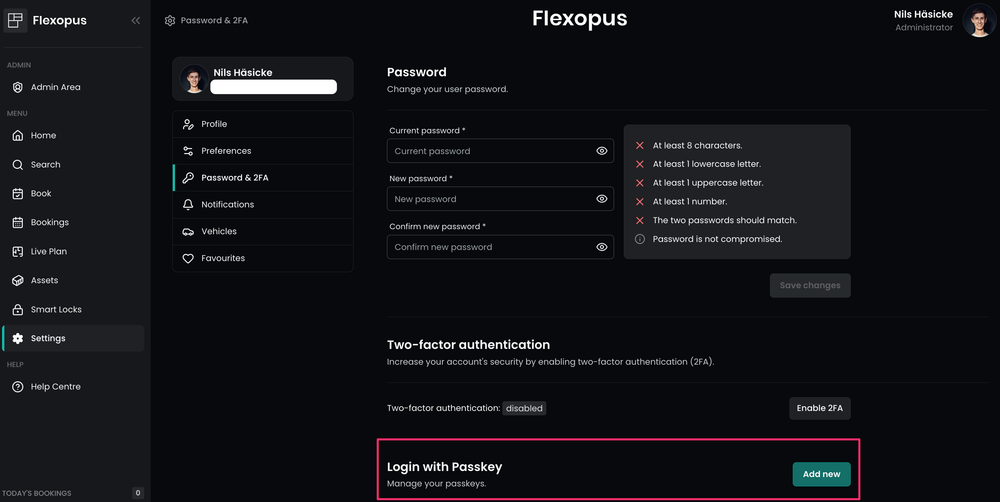
Starting with Flexopus version 2.52.0, Passkey Login is available for the web application. Administrators can activate the feature centrally. Users can then create a passkey for their account in their personal profile settings.
After setup, an additional option for logging in with a passkey appears on the Flexopus login page. This adds a particularly convenient, password-free access method to the previously configured login options.
Support in the mobile Flexopus applications is planned for a later date. Currently, the new feature applies to the web version.
How Passkey Login works in Flexopus
Once set up, the login process is completed in just a few steps:
- Flexopus users open the login page of their Flexopus instance.
- They select the option to log in with a passkey.
- The device requests the configured confirmation.
- The login is authorized, for example, via fingerprint, facial recognition, device PIN, or security key.
- Flexopus verifies the cryptographic proof and logs the user in.
A Flexopus password does not need to be entered during this process.
The exact appearance of the login may vary depending on the operating system, browser, device, and the passkey provider used. However, the basic process remains the same: the user confirms the login via a trusted authenticator.
What are the benefits of Passkey login?
Faster login
Passwords often have to be copied from a password manager or entered manually. With passkeys, you can generally use the same method you already use to unlock your device.
This makes accessing Flexopus faster, especially in your daily work routine. Employees can reserve a desk, check a booking, or open the live plan without long interruptions.
No more forgotten passwords for daily logins
Complex passwords are hard to remember. Simple passwords, on the other hand, are easier to guess and are frequently reused across multiple services.
When logging in with a passkey, users do not need to enter or memorize a Flexopus password. This reduces common issues like typos, forgotten credentials, and unnecessary password resets.
Better protection against phishing
In a classic phishing attack, users are directed to a fake login page and prompted to enter their password.
Passkeys are bound to the domain for which they were created. A passkey set up for a Flexopus instance cannot, therefore, be easily used on a foreign or malicious domain.
Protection against stolen password data
Passkeys do not require a shared password for authentication. Instead, the device uses a private key to cryptographically prove that the user possesses the correct passkey.
The server stores the public part of the key pair. This can be used to verify a login, but it does not allow for the reconstruction of the private key.
Convenience and security without extra steps
Security is often perceived by users as an additional burden. Passkeys combine both goals: login becomes easier while simultaneously reducing the typical risks of password-based methods.
For companies, this means that a more secure login method does not necessarily have to lead to a more complicated user experience.
Enable Passkey login for admins
Before employees in your company can create a passkey for Flexopus, the feature must be enabled by an administrator.
The setting can be found in the Flexopus admin area under:
Admin Area → Global Settings → Authentication → Passkey Login
Once activated, users can independently add a passkey to their profile.
Admins should briefly inform their employees about the following points when activating the feature:
- why the company is offering passkeys,
- which devices and authentication methods can be used,
- how to set up a passkey,
- which alternative login method is available in case of issues,
- who users should contact if they change devices or lose a security key.
A brief internal guide can significantly speed up the adoption of the new feature.
Setting up a personal passkey in Flexopus
Once an administrator has enabled passkey login, employees can create their personal passkey.
The corresponding setting can be found in the user profile under:
Profile settings → Password & 2FA
A new passkey can be added there. The device or browser being used will then guide you through the setup process. Once successfully registered, the additional passkey option will be available on the login page.
The specific steps may vary depending on the operating system and authenticator. Creation is often confirmed using a device PIN, fingerprint, or facial recognition.
What happens when changing devices?
How a passkey is made available on a new device depends on the passkey provider being used.
Synchronized passkeys can be available on multiple devices via the associated credential or password manager. Other passkeys are strictly tied to a specific device or a physical security key. The FIDO Alliance distinguishes between synchronized and device-bound passkeys accordingly.
Companies should therefore continue to provide at least one regulated recovery or alternative login process. Users should also check their passkeys in their Flexopus profile settings and remove any access keys that are no longer needed.
Which companies is passkey login suitable for?
Passkey login offers benefits for companies of all sizes. It is particularly relevant for organizations that:
- want to simplify the login process for their employees,
- want to reduce reliance on passwords,
- want to offer their users a phishing-resistant login option,
- have many daily or recurring Flexopus logins,
- manage external or decentralized users without a shared SSO system,
- want to integrate modern authentication methods into their IT strategy.
An uncomplicated login is also helpful in a hybrid work environment. Employees access Flexopus from various locations to book desks, rooms, or parking spaces, for example. A fast login reduces unnecessary hurdles.
The most important questions summarized
What is the new Passkey Login in Flexopus?

The Passkey Login enables password-free access to the Flexopus web application. Instead of a password, users verify their login via fingerprint, facial recognition, device PIN, or a compatible security key. This makes access faster and reduces the typical risks associated with traditional passwords.
What are the advantages of passkeys over passwords?
Passkeys are more convenient and offer better protection against phishing. Users do not need to remember a password or enter it repeatedly. The private key remains on the device or with the authenticator used and is not transmitted to Flexopus. This reduces the risk posed by stolen, reused, or phished passwords.
How is Passkey Login set up in Flexopus?
Administrators enable Passkey Login in the admin area under global authentication settings. Users can then add a personal passkey in their profile settings under "Password & 2FA." Once set up, the passkey will appear as an additional login option on the Flexopus sign-in page.
Last updated:
2026-10-12
.svg)


.webp)