Workplace Management
2026-07-31
Room management with Outlook: How Flexopus complements the hybrid office
While Outlook is well-suited for traditional room booking, it reaches its limits in a hybrid office environment. Flexopus expands room management to include workstations, parking spaces, catering, and other resources. Thanks to a bidirectional Exchange integration, bookings remain synchronized across Outlook and Flexopus, effectively preventing double bookings.

Table of contents
Microsoft Outlook ist in vielen Unternehmen das wichtigste Werkzeug für die Terminplanung. Neben Teilnehmenden und Kalendern lassen sich darüber auch Besprechungsräume und andere Ressourcen organisieren. Mitarbeitende können direkt beim Erstellen einer Besprechung einen verfügbaren Raum auswählen und zur Einladung hinzufügen.
Eine klassische Raumverwaltung mit Outlook stößt im hybriden Büro jedoch schnell an Grenzen. Moderne Unternehmen müssen nicht nur Besprechungsräume verwalten, sondern auch flexible Arbeitsplätze, Parkplätze und weitere Betriebsmittel koordinieren.
Flexopus verbindet deshalb die gewohnte Outlook-Raumbuchung mit einer zentralen Workplace Management Lösung. Dank der Microsoft Exchange Integration bleiben Buchungen in Outlook und Flexopus bi-direktional synchron. Gleichzeitig können Mitarbeiter und Mitarbeiterinnen mit Flexopus auch Desk Sharing und weitere gemeinsam genutzte Ressourcen organisieren.
Was ist Raumverwaltung mit Outlook?
Bei der Raumverwaltung in Outlook werden Besprechungsräume als Ressourcen in Microsoft Exchange Online oder On-Prem angelegt. Jeder Raum erhält ein eigenes Ressourcenpostfach und einen zugehörigen Ressourcenkalender.
Möchte ein Nutzer einen Outlook Raum buchen, erstellt er zunächst einen Termin oder eine Besprechung. Anschließend kann er die benötigten Teilnehmer und einen verfügbaren Raum hinzufügen.
Das Ressourcenpostfach verarbeitet die Besprechungsanfrage ähnlich wie eine eingeladene Person. Es prüft, ob der gewünschte Zeitraum verfügbar ist und ob die hinterlegten Buchungsoptionen eingehalten werden. Ist der Raum frei, wird die Reservierung bestätigt. Ist er bereits gebucht, kann die Buchungsanfrage automatisch abgelehnt werden. Je nach Microsoft-Konfiguration lassen sich Besprechungsräume nach Standort, Gebäude, Kapazität oder Ausstattung filtern.
Unternehmen können unter anderem folgende Regeln definieren:
- maximale Dauer einer Buchung
- mögliche Reservierungen im Voraus
- automatische Bestätigung oder Ablehnung
- Freigabe durch einen Stellvertreter
- zulässige Serienbuchungen
- Einschränkungen für bestimmte Personen oder Teams
- Berücksichtigung von Kapazität und Ausstattung
Warum Outlook allein für hybride Büros nicht ausreicht
Die klassische Raumverwaltung mit Outlook konzentriert sich auf Kalender und Termine. Für ein modernes Desk Sharing Konzept müssen Unternehmen jedoch deutlich mehr Ressourcen verwalten.
Diese Ressourcen lassen sich nicht sinnvoll über einzelne Outlook-Kalender organisieren. Bei vielen Arbeitsplätzen würde für jeden Schreibtisch ein eigenes Postfach oder ein separater Kalender benötigt. Die Orientierung wäre für Nutzer kompliziert und die Verwaltung für die IT aufwändig.
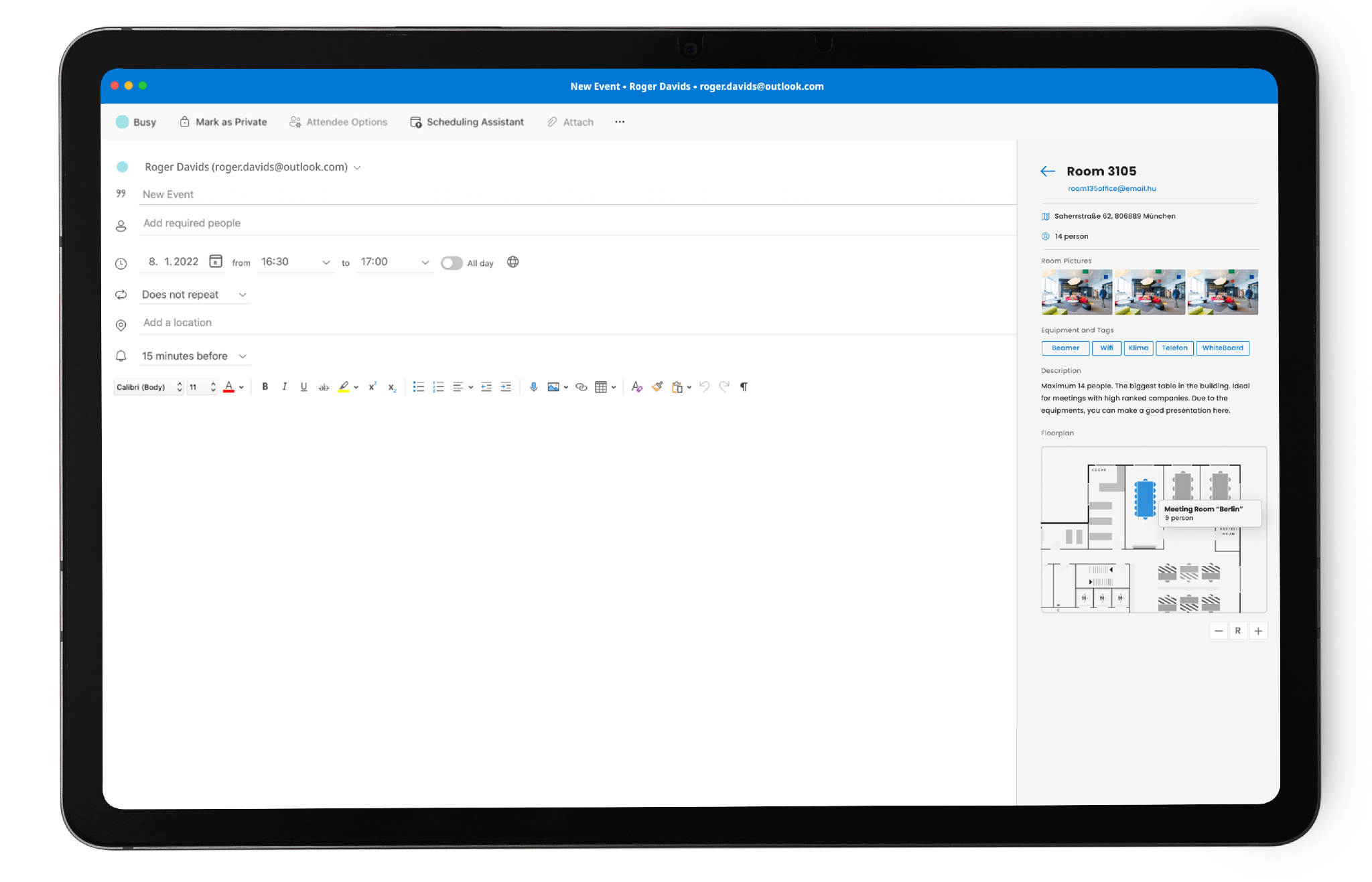
Hinzu kommt, dass Outlook Räume hauptsächlich in Listen darstellt. Mitarbeiter sehen häufig nicht direkt, wo sich ein Raum befindet, welche Arbeitsplätze in der Nähe liegen oder wie eine Etage aufgebaut ist.
Genau hier setzt Flexopus an.
Flexopus verbindet Raumbuchung und Desk Sharing
Flexopus is a workplace management solution for booking desks, meeting rooms, and parking spaces. All resources are displayed on interactive building and floor plans.
Users first select the desired time frame and location. They can then see on the floor plan which desks, rooms, or parking spaces are still available. Resources can also be filtered by features, equipment, or capacity.
In this way, Flexopus combines room management with a complete desk sharing software. Users can book their most important office resources via a single application instead of using various calendars, lists, and booking systems.
Integrating Microsoft Exchange with Flexopus
Companies that already manage their meeting rooms via Outlook do not need to replace their existing process. Flexopus can be connected directly to Microsoft Exchange.
For Exchange Online, integration is handled via the Microsoft Graph API. The resource calendars for the meeting rooms are linked to the corresponding rooms in Flexopus.
Synchronization works bidirectionally:
- A room booking created in Outlook appears automatically in Flexopus.
- A reservation created in Flexopus is transferred to Microsoft Exchange.
- Changes and cancellations are reconciled between both systems.
- Microsoft Exchange remains the central authority for confirming a booking.
Since both solutions access the same resource calendar, the booking status remains consistent. A room booked via Outlook is also shown as occupied in Flexopus. Conversely, a booking made via Flexopus appears in the user's Outlook calendar. This prevents double bookings.
Manage catering and external guests directly via the Flexopus Outlook Add-in
With the Flexopus Outlook Add-in, you can not only book meeting rooms but also include catering and facility services as well as external guests directly during appointment scheduling. This allows additional services to be organized conveniently within the familiar Outlook workflow.
Depending on the Flexopus modules used, users can, for example, do the following when creating a meeting:
- Order catering and refreshments for the appointment
- Add facility services and other amenities
- Invite external guests and visitors directly to the meeting
- Collect relevant visitor data before the appointment
- Allow guests to check themselves in on-site
Combining Outlook and desk sharing effectively

Flexopus complements Outlook room management with additional features for the hybrid workday. In addition to meeting rooms, employees can also book desks and parking spaces, allowing them to plan their office day centrally.
Via iCal synchronization, personal Flexopus bookings can also be transferred to external calendars such as Microsoft Outlook. Booked desks, parking spaces, or other resources therefore also appear in your personal calendar, keeping them in view alongside your other appointments.
Optionally, Flexopus can also be synchronized with the Microsoft work location feature. If, for example, a desk or home office is booked in Flexopus, the corresponding work location can also be displayed in Microsoft 365 or Outlook. This makes it easier for colleagues to see whether someone is working in the office or remotely.
This creates a seamless process for companies:
- Desks and parking spaces are booked centrally via Flexopus.
- Personal bookings can be displayed in the Outlook calendar via iCal.
- Desk and home office bookings can be synchronized with the Microsoft work location.
- Meeting rooms are reserved via Outlook or Flexopus and reconciled via Exchange.
- All resources remain centrally manageable in Flexopus.
Benefits of the Flexopus Exchange integration
Die Kombination aus Flexopus, Outlook und Microsoft Exchange bietet Unternehmen mehrere Vorteile:
- existing Outlook processes remain in place
- room bookings are synchronized bi-directionally
- employees can use either Outlook or Flexopus for bookings
- interactive floor plans make navigation easy
- capacity and equipment are visible at a glance
- double bookings are prevented
- workstations, rooms, and parking spaces are managed centrally
- desk sharing and room booking are fully integrated
- users without their own Microsoft 365 license can also book resources via Flexopus
- room displays, check-in, and usage analytics can be added
Fazit: Mehr als klassische Raumverwaltung mit Outlook
Die Raumverwaltung mit Outlook bietet eine solide Grundlage für die Buchung von Besprechungsräumen über Microsoft Exchange. Für hybride Unternehmen mit flexiblen Arbeitsplätzen, Parkplätzen und wechselnden Büroanwesenheiten reicht sie jedoch oft nicht aus.
Flexopus ergänzt Outlook und Exchange um eine zentrale Workplace Management Plattform, in der sich Räume, Arbeitsplätze, Parkplätze und weitere Büroressourcen übersichtlich verwalten lassen.
The most important questions summarized
How does room management with Outlook work?

Meeting rooms are created in Microsoft Exchange as resources with their own calendars. When scheduling an appointment in Outlook, an available room can be added directly. Exchange automatically checks availability and booking rules, then confirms or declines the reservation accordingly.
Why is Outlook often insufficient for hybrid offices?
Outlook is primarily designed for appointments and room calendars. In hybrid offices, however, desks, parking spaces, equipment, team proximity, check-ins, and other services must also be coordinated. Managing individual calendars or mailboxes for these resources would be confusing and time-consuming.
How does Flexopus complement Outlook room management?
Flexopus connects Outlook and Microsoft Exchange with a central workplace management platform. Rooms, desks, and parking spaces can be booked on interactive floor plans. Room bookings are synchronized bidirectionally, ensuring that reservations from Outlook and Flexopus remain consistent and double bookings are avoided.
Last updated:
2026-10-12
.svg)

.webp)
.webp)
.jpeg)