Desk sharing
2026-03-18
.webp)
The costs of desk sharing software: pricing models and calculation tips
The costs of desk sharing software depend on various factors such as the range of functions, pricing model and target group. Companies can choose between different billing models, for example based on users or resources. Read on to find out how desk sharing software can help you make better use of your workplaces and thus reduce your business costs.

Table of contents
How much does desk sharing software cost?
For companies and especially their purchasing department, one thing is often in the foreground when introducing desk sharing and selecting suitable software: costs. The market for desk sharing and workplace management providers has grown rapidly, particularly in recent years, making it easy to lose track of things.
In order to find the right provider for you when choosing the right solution here, you need a good price overview.
Here, you are faced with the difficult task of finding a software solution that offers the desired functionalities, meets the company's data protection and data security requirements and also fits within the budget. Not easy at all with different pricing models and different range of functions. This blog article is intended to support this and provide an initial overview.
Who needs desk sharing software?
For most companies or organizations, there is an important reason for introducing a desk sharing software. The core aspect is to have fewer jobs available than the total number of employees employed or assigned to the location. Home office, part-time models and flexible working models mean that many desks are often empty for hours or days. Desk sharing maximizes the utilization times of various workplaces and resources without sacrificing manpower.
Desk sharing is therefore suitable for anyone who wants to benefit from more efficient use of space and office space optimization, or for those who want to completely save some space. These can be small companies as well as large corporations.
How are desk sharing software costs made up?
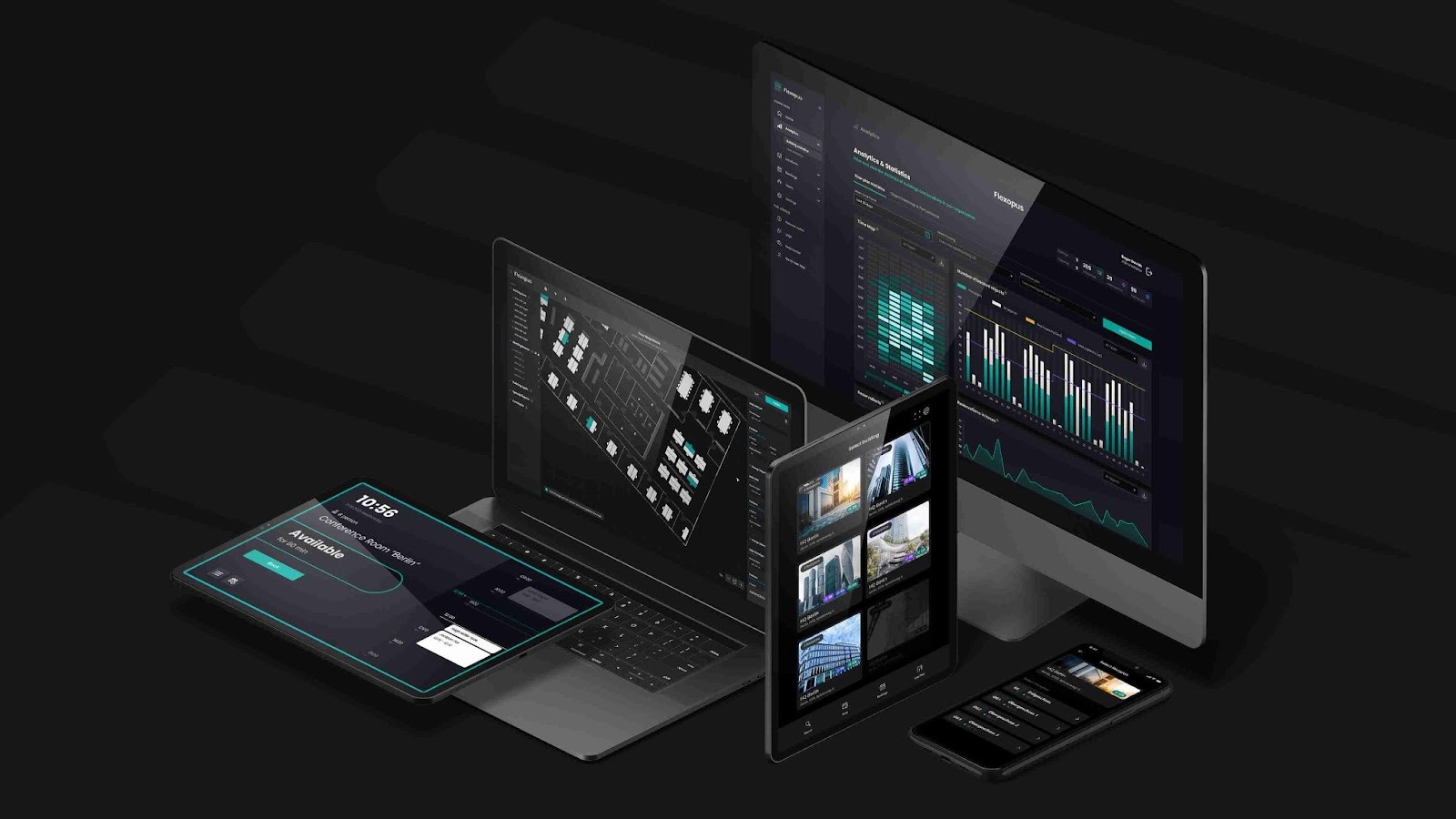
The cost of desk sharing software varies depending on Features, pricing model, target group, and integration. Providers offer various packages that are tailored to the needs of the company. Billing is based either on users, resources or square meters. Special requirements, such as integration into existing systems or focus on specific work models, also influence costs.
The costs of desk sharing software depend on several factors:
1. Features:
Some features are priced higher than others. That is why many providers offer a selection of different packages that cover different needs. Some features are essential for productivity and seamless collaboration in the work environment, while others are just “nice to have.”
2. Pricing model:
Not all providers charge using the same metric. While some bill by user, others use resources (jobs) as a basis for calculating the price, others calculate by square meter.
3. Target group:
Some providers are aimed specifically at specific user groups or special work models, such as heavily regulated companies or those with a high proportion of working from home.
4. Integration & Setup:
On the customer side, there are often special requirements regarding integration into existing systems or the connection to tools that have already been used, such as Microsoft Teams or Outlook. Providers with comprehensive integration options combined with a simple setup score points here.
Depending on the combination of these factors, there are different costs, which should be individually tailored to the needs of the company.
How can you calculate desk sharing costs?
The calculation of costs depends on many parameters: size of the office, number of employees, number of desks and, ultimately, on the chosen pricing model.
What is important is the personal desk sharing rota. This quota describes how many employees share a job. Here, the number of employees is simply divided by the number of available jobs. A quota greater than 1 is desirable to ensure efficient use of office space and thus achieve cost savings.
Based on this quota, companies can then choose the appropriate model and software to achieve maximum benefits at minimum costs.
The most common desk sharing pricing models
The most common pricing models in the area of desk sharing software are:
By user
Here, billing is based on the number of users. This is the most common model. One disadvantage is that contracts must be constantly adjusted when the number of employees fluctuates. In addition, desk sharing usually has more employees than workstations, which can have a negative effect on the overall price.
By resources
When calculating the license fee, this pricing model is based on the number of workstations, meeting rooms or parking spaces. This results in predictable and fair billing, which is a good fit for companies with a desk sharing rate greater than 1.
Desk sharing software price comparison
To get an overview of the jungle of desk sharing providers, here is an example of Flexopus, which does not bill by users but by resources, and an exemplary other provider who bills by user.
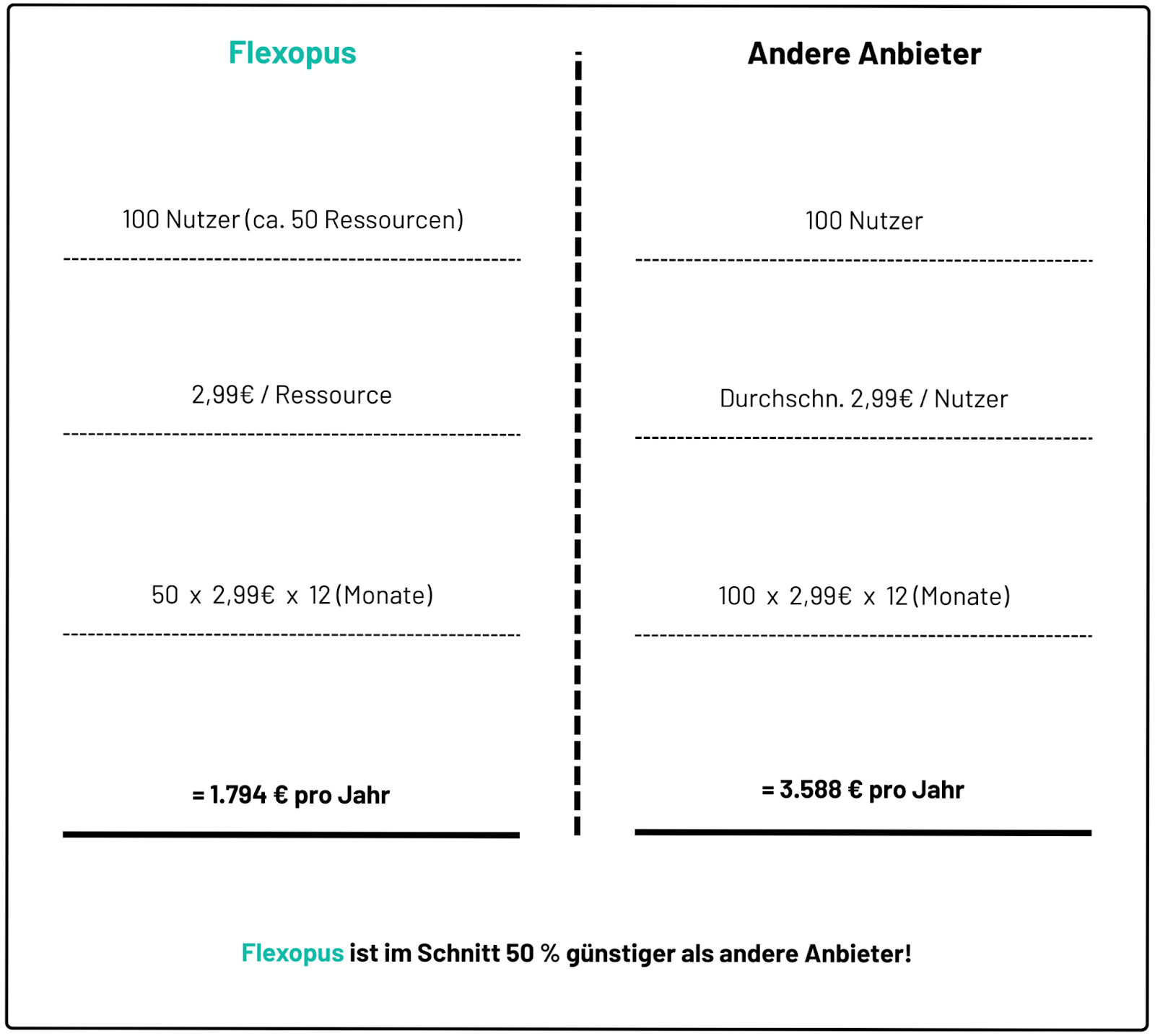
The rate of two users per workplace (2:1) was calculated using the average of all existing Flexopus customers. On average, two users share a workplace, so that the price is halved compared to billing according to the user metric.
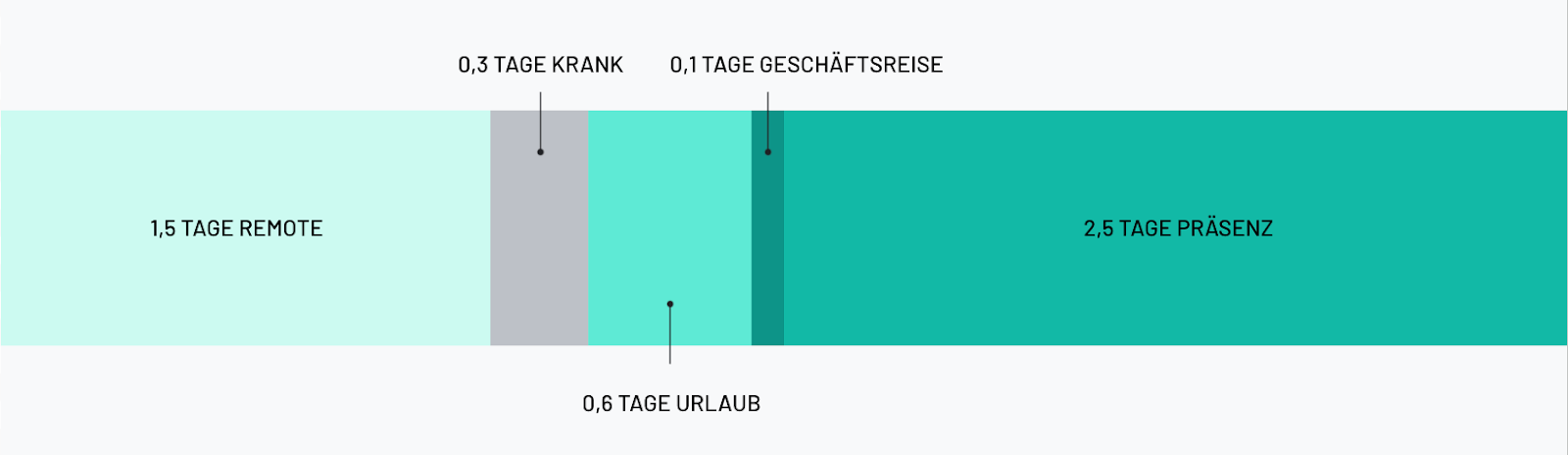
Is this figure realistic? Absolutely. According to a study by Leibniz Institute German companies offer their workers an average of 1.5 days of remote work per week. Statistically speaking, there are 0.3 days sickness and 0.6 days vacations and 0.1 days on training or on a business trip. Conclusion: 50% of the time, the employee is not in the office and therefore does not need a job for half of the week.
Conclusion
The introduction of desk sharing software offers companies a valuable solution for optimizing the use of workplaces and office space and, if necessary, even completely saving space and thus sustainably saving costs.
A transparent selection of the necessary desk sharing software is just as important. Based on the individual desk sharing rate, a suitable pricing model (user-based vs. resource-based) should be selected for the company in order to travel efficiently and cost-effectively here as well.
The most important questions summarized
Which factors influence the costs of desk sharing software?

The costs of desk sharing software vary depending on the range of functions, pricing model and target group. Vendors offer different packages that can be selected depending on the company's needs. The decisive factors include how many users or resources are billed and how the software can be integrated into existing systems. Companies must choose the pricing model that best suits their desk sharing ratio and requirements.
What are the pricing models for desk sharing software?
The most common pricing models are user coverage (billing by number of users) and resource coverage (billing by workstations or meeting rooms). While the model according to users is suitable for companies with fluctuating numbers of employees, the model according to resources is more suitable for companies with a high desk sharing rate (more users than jobs). The resource-based model offers greater cost transparency and calculable billing.
How do you calculate the desk sharing rate and why is it important?
The desk sharing rate describes the ratio of users to available jobs. It is calculated by dividing the number of employees by the number of jobs. A quota greater than 1 is advantageous because it shows that fewer jobs are being used for more employees. A high ratio helps to make better use of office space and to save costs. The right desk sharing ratio helps to choose the right pricing model and achieve maximum benefits.
Last updated:
2026-07-24
.svg)

.webp)