Flexopus News
2025-04-02
Visitor registration made easy with Flexopus
First impressions count! In this article, you'll learn how Flexopus Visitor Registration digitizes and professionalizes the reception of your guests. From pre-registration to automatic check-in to notifying hosts, we'll show you how to reduce waiting times, increase security and leave a lasting, modern impression on every visitor.

Table of contents
In an increasingly connected working world, face-to-face meetings and shared spaces are becoming more important than ever. In the hustle and bustle of daily life, the goal is to welcome arriving guests without cumbersome processes. With Flexopus Visitor management software visitor registration and management become easier and more straightforward than ever before.
Digital visitor registration allows you to structure and prepare for guests even before their appointment. Online visitor registration not only simplifies planning but also ensures that reception staff and hosts are informed about arriving guests well in advance.
From the initial invitation and registration to the on-site check-in, our system ensures a smooth process and maximum security. Whether you are hosting one-time visitors or regular business partners, Flexopus helps you stay organized and turns your reception into a professional experience.
Visitor registration with Flexopus
Flexopus visitor management allows you to register office guests paperlessly. The software digitizes the entire visitor management process—from registration and verification to on-site reception, including visit logging.
Digital visitor logging ensures that all relevant visitor data is documented centrally and transparently. Companies can register new visitors, reuse existing visitor data, and manage recurring guests with ease.
Guests receive an invitation via email and can verify themselves in advance or complete the necessary steps on-site at a visitor kiosk. Additionally, the reception has a real-time overview of all visitors, including statistics. This serves not only for general oversight and administrative purposes but can also be used for security-related matters in an emergency. For example, in the event of an evacuation, it can be used to verify who was in the office at that time or who should be contacted afterward.
Visitor invitation process
The visitor invitation process is intuitive, encouraging consistent and meaningful use of the tool. Adjustments can be made within the process to customize the visitor reception experience, such as for signing important documents.
The actual process can be broken down into simple steps, distinguishing between visitor registration and specific bookings for visitors:
Visitor registration takes place either in advance via an email invitation or directly at the reception desk. This allows visitor registration to be flexibly integrated into existing reception workflows and adapted to specific company requirements.
Visitor registration
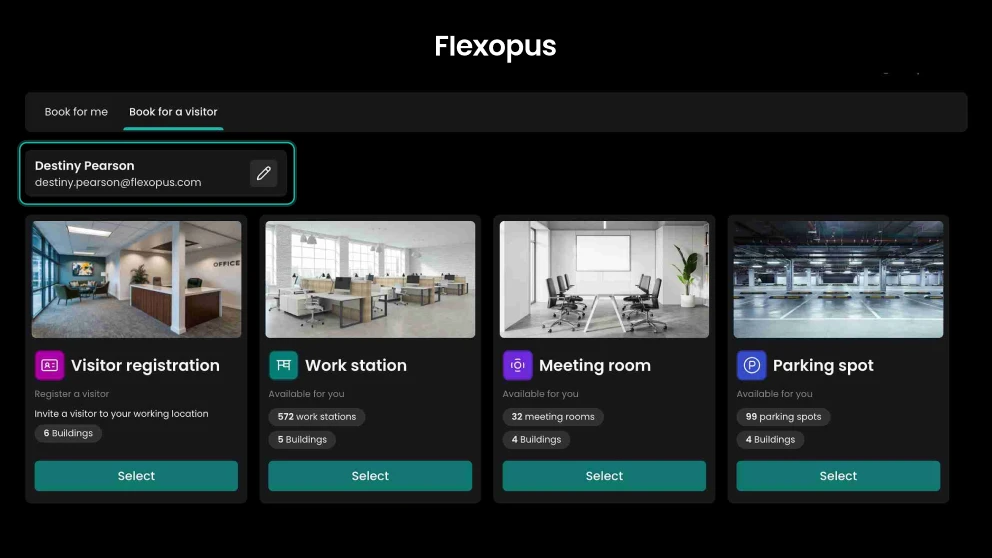
- Book for a visitor
- Select a visitor or create a new one
- Select visitor registration. A new visitor can also be created at the same time.
- Enter booking details
- Save
- The registered visitor receives an email invitation with all necessary booking details and a personalized code for check-in. Important documents, such as privacy policies or visitor guidelines, can be reviewed and accepted in advance. This makes the actual check-in on the day of the visit as simple as possible.
Workstation, meeting room, or parking space for visitors
- Book for a visitor
- Select a visitor or create a new one
- Select workstation, meeting room, or parking space
- Complete the standard booking process
- Save
- If required, the selected visitor will receive an email notification containing all booking details and can also access the live plan via a link in the email. This allows the visitor to independently find their booked resource after checking in.
- The guest booking is now displayed in the personal booking overview
Visitor invitations and guest bookings can also be managed via the admin area. A daily and overall overview of guest bookings is also available here.

Configuration options for visitor invitations
All visitor invitations can be viewed and managed via the admin area. Changes to booking or guest details can also be made here retrospectively, and an overview of all visitors to your company is available. This means that recurring visitors do not need to be created again each time.
In addition to the general activation of the module, you can also manage whether booking users should have administrative rights over invitations. This allows responsibility to be either shared or restricted to an admin.
Access to the cross-user visitor database can also be restricted. This allows users to only see and select visitor profiles that they have created themselves.
In the settings, you can also store and edit the email greeting text, the mandatory fields to be filled out, or documents relevant to the visitor.
In addition to visitor invitations, the optional kiosk terminal and the option for digital signage are also enabled here.
Kiosk terminal and digital signage
The optional kiosk terminal and the associated digital signage make reception quick and easy on the day of the visit.
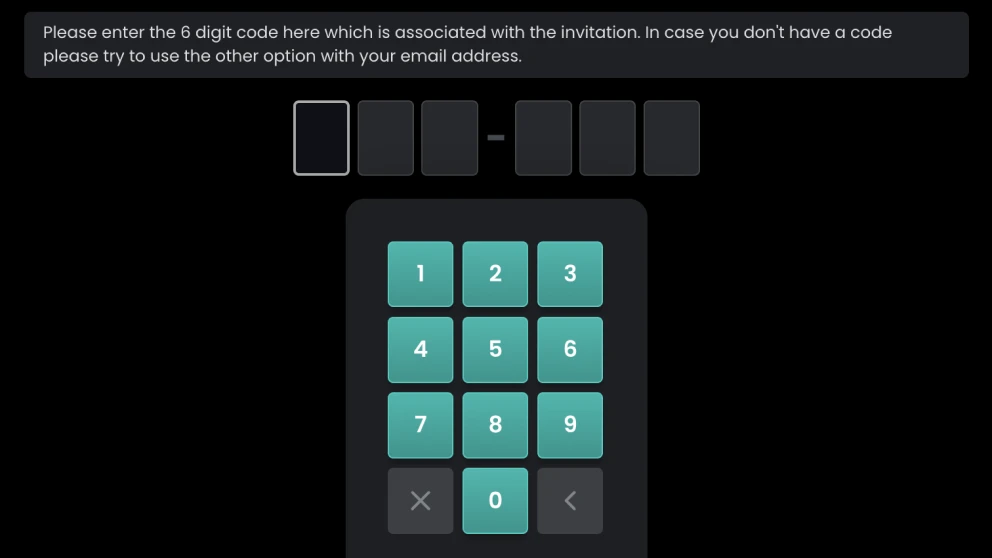
Digital visitor registration is particularly easy to carry out at the kiosk terminal. Invited guests enter their personal code, add any missing information if necessary, and complete the visitor registration directly on-site.
The entrance thus serves as a second interface for registration and fulfills several functions:
Capturing visitor data:
If visitor data was not completed in advance, it can optionally be added at the kiosk terminal. This ensures every visitor is recorded in detail and can also enter their personal information themselves.
Completing important documents:
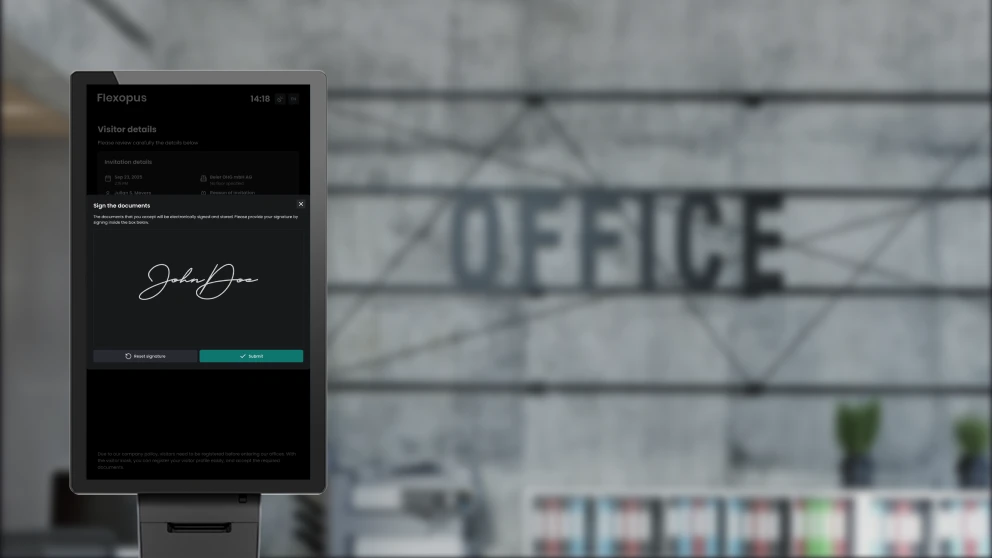
If important documents were forgotten in advance or new ones were added between the invitation and arrival, these can also be digitally signed during the registration process.
The digital signage option allows you to capture signatures directly and paperlessly. Examples include general terms and conditions, NDAs, or information regarding data protection or data processing. This saves time and space and simplifies the entire reception process without violating regulations or neglecting important information.
Protecting visitor data
With Flexopus, you benefit from GDPR-compliant data protection. This is of the utmost importance not only when managing user and company data, but also when receiving external guests and using visitor management. Stored user-related data is therefore only saved for its intended purpose.
Flexopus is hosted in Germany, and all data is stored exclusively on servers of Hetzner GmbH in Bavaria. Both Hetzner GmbH and Flexopus are ISO27001 certified. Consequently, all processes comply with the highest IT security procedures and information security management systems.
Through the kiosk terminal and digital signage, you protect not only the visitors' data but your own as well. For sensitive topics, a non-disclosure agreement can be signed and digitally recorded directly at the reception. Internal company details remain protected without having to deny the possibility of a personal visit.
The storage of user-based analytical data for visitor registration can be time-limited. This gives you maximum flexibility and allows you to meet the requirements of every visitor.
Advantages of visitor management
Here is an overview of the advantages of Flexopus visitor management:
Visitor invitation:External guests can be easily invited to the office via email notification. They receive all necessary booking details and their personal entry code. In addition, they can complete important documents in advance.
Digital visitor list:As an admin, you keep track of all visitors present. Together with the user list, it is possible to track who was in the office at what time.
Check-in/Check-out:The Check-in feature serves the same purpose as that for regular users. This allows you to verify the time window in which invited visitors arrived and ensures that only people with an official invitation can enter.
Kiosk terminal:A tablet is used here to make visitor registration as simple as possible. Invited visitors can check in effortlessly using their invitation code. This saves both paper and staff time.
Digital signage:Important or confidential documents can be signed digitally on-site. This makes paperless recording of visitor consent simple and straightforward.
In addition to digital visitor management, Flexopus offers further modules for a unified Workplace Management. With the Desk sharing software employees can book workstations flexibly, while the room booking software and the digital parking space booking system simplify the management of meeting rooms and company parking spaces. Additionally, the Asset management software enable digital inventory management, the catering and facility services module the organization of office services and Meeting room displays a transparent display of room occupancy. In this way, Flexopus combines all important functions for a modern office routine on one central platform.
Conclusion
Flexopus visitor registration digitizes, optimizes, and streamlines the entire visitor process. From simple email invitations and fast, seamless check-ins to the digital signing of important documents, the system offers a flexible and professional solution for receiving and managing your guests.
From digital visitor registration and check-in to digital visitor logging, Flexopus helps companies manage visitor processes in a paperless, transparent, and secure way.
The user management system is impressive not only for its ease of use but also for its high security standards and GDPR-compliant data storage. You maintain full control over visitor flows at all times and can set individual access rules. Additionally, digitization reduces manual administrative effort, minimizes sources of error, and ensures transparent documentation of all visitor movements.
Whether for small businesses or large corporations, Flexopus makes guest reception easier, smarter, and more professional while maintaining a modern and innovative workflow.
The most important questions summarized
How does digital visitor management improve the reception process in companies?

A digital system puts an end to illegible paper lists and long wait times. Visitors can be registered in advance and receive all important information (directions, Wi-Fi, appointment details) via email. On-site, the check-in process is contactless and fast via a tablet. The host is immediately notified automatically via message (e.g., Teams or email) that their guest has arrived. This ensures a smooth process, relieves the reception staff, and creates a professional atmosphere from the very first second.
What role do security and GDPR play in digital visitor management?
Security and data protection are our top priorities. With Flexopus, you can easily meet GDPR requirements, as visitor data can be automatically deleted after a defined period – unlike analog lists, which are visible to everyone. In addition, in an emergency (e.g., an evacuation), you have a digital real-time list of all people in the building at your fingertips. Safety instructions can be signed digitally directly during check-in, which legally documents your company's compliance requirements.
Can Flexopus visitor management be integrated into existing IT infrastructures?
Yes, seamless integration is a core advantage. Flexopus can be linked with common calendar systems such as Microsoft 365 and Google Workspace. When an employee schedules a meeting, they can register the guest at the same time. Synchronization ensures that all data remains up to date. Furthermore, the system can be connected to communication tools like Slack or Teams to inform hosts about the arrival of their guests in real time. This connectivity prevents data silos and makes visitor management an integral part of your digital workflow.
Last updated:
2026-11-17